

If you’re researching ERP WMS options, you’re probably trying to work out whether your existing enterprise resource planning system is enough for your warehouse, or whether you need a dedicated warehouse management system alongside it. It’s a question that comes up constantly in growing businesses, and the answer isn’t always obvious. This guide cuts through the jargon and gives you a clear picture of what each system does, where each one falls short, and how to decide what’s right for your operation.
What is an ERP system?
Enterprise resource planning software is a centralised business management platform. It handles finance, procurement, sales orders, human resources, manufacturing, and often inventory in a single database. The appeal is obvious: one system, one source of truth, everything talking to everything else.
The most widely used ERP platforms in the UK are SAP, Microsoft Dynamics 365, and Oracle NetSuite. Each offers a broad range of modules covering virtually every business function. Sage and Epicor are also popular with mid-market businesses, particularly in wholesale distribution and manufacturing.
ERP systems are designed for breadth. They’re built to give senior managers and finance teams a consolidated view of the business. That’s their strength, and it’s also where the tension with warehouse operations begins.
What is a WMS and how does it differ from ERP?
A warehouse management system is purpose-built software for controlling every physical movement inside a warehouse. Where ERP tracks that you have 200 units of a product in stock, a WMS tells you exactly which bay, which shelf, and which pallet those 200 units are on, who picked them, when, and in what sequence.
The core difference is depth versus breadth. ERP goes wide across your whole business. A WMS goes deep into warehouse operations. As Acumatica explains in their WMS vs ERP comparison, an ERP’s warehouse module typically handles inventory records and purchasing, but it rarely controls the granular, real-time floor-level activity that a standalone WMS manages.
A dedicated WMS handles:
- Directed putaway: The system tells operatives exactly where to put incoming stock based on rules you define, such as product family, weight, velocity, or temperature zone.
- Optimised pick paths: Rather than leaving pickers to wander, the WMS sequences picks to minimise travel time, cutting picking hours substantially.
- Picking and packing workflows: Scan-to-confirm picking, packing station management, box size selection, and label printing all run through the WMS, reducing errors and speeding up despatch.
- Real-time stock location: Every location holds accurate, live stock data, not batch-updated figures from an ERP sync.
- Batch, FIFO, and serial number tracking: Essential for food, pharmaceutical, and regulated goods.
- Returns management: Grading, re-slotting, and updating inventory records for returned items.
In short, an ERP knows you have stock. A WMS knows where it is, who touched it, and what happens next.
What is an ERP system in a warehouse?
Most ERP platforms include a warehouse or inventory module. For small operations, this is often enough. If you’re running a single warehouse with a small team, straightforward products, and manageable order volumes, the inventory module inside your ERP can do the job.
The problem is that ERP warehouse modules are built as an afterthought to the core financial and operational suite. They aren’t designed to run real-time floor operations at pace. Common limitations include:
- No directed picking: Operatives use paper pick lists or basic screen prompts rather than dynamically optimised routes.
- Limited location management: Many ERP systems track stock by warehouse rather than by individual bin location, making precise inventory control difficult.
- Poor RF and mobile support: Handheld scanners and mobile devices are often bolted on rather than native, creating clunky user experiences on the warehouse floor.
- Batch updates rather than real-time: Inventory records may update on a delay, meaning what the system shows and what’s physically in the warehouse can diverge.
- Weak support for 3PL billing: If you’re a third-party logistics provider managing stock on behalf of multiple clients, ERP systems offer little native support for per-client billing structures.
As your volume grows and your operation becomes more complex, these limitations start causing real problems: mis-picks, stockouts, poor space utilisation, and slow despatch times.
Do you need both an ERP and a WMS?
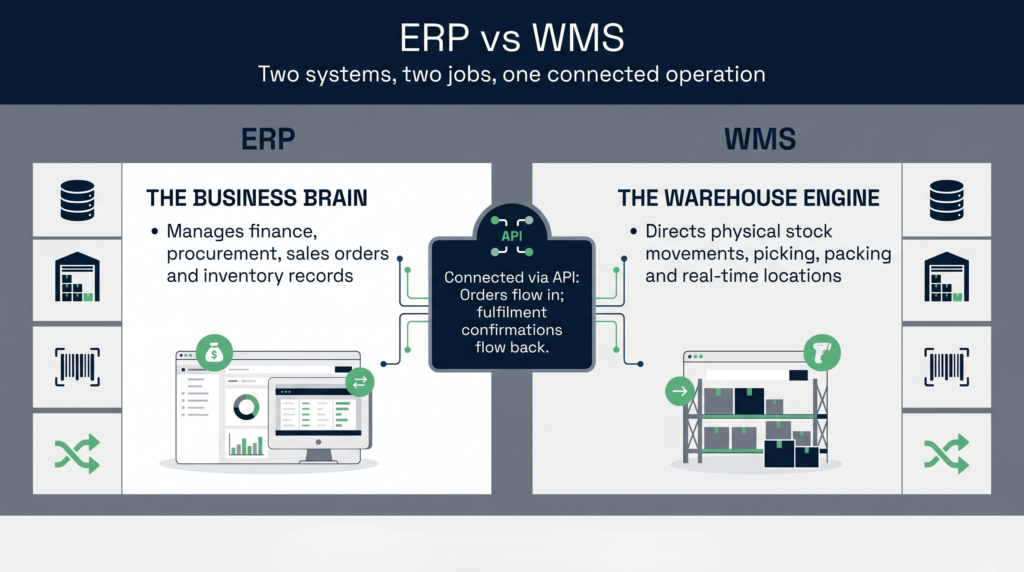
For many growing businesses, yes. The two systems complement each other rather than compete. Your ERP handles the commercial and financial layer. Your WMS handles the physical execution layer. The key is integration between them.
Think of it this way. A customer places an order in your ERP. The ERP passes that order to the WMS. The WMS directs your team to pick, pack, and despatch the order, managing every step at the warehouse floor level. Once shipped, the WMS sends fulfilment confirmation back to the ERP, which updates stock records, triggers invoicing, and closes the order.
This kind of connected workflow means neither system is doing the other’s job. Each does what it does best. Bluelink ERP’s analysis of WMS versus ERP software makes a similar point: the two systems are most powerful when they work together rather than when one tries to replace the other.
The businesses that get into trouble are those that try to stretch their ERP to cover warehouse execution, or those that run a WMS without connecting it to their financial system. Both approaches create silos, and silos create errors.
When should you use a WMS instead of relying on your ERP?
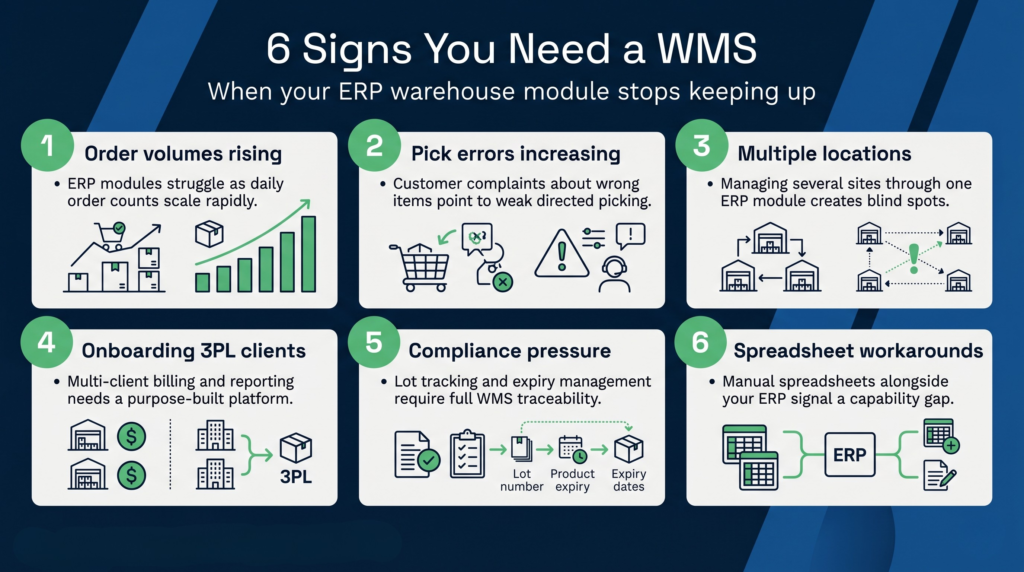
There are clear signals that your ERP’s warehouse module is no longer keeping up:
- Order volumes are climbing: What worked at 100 orders a day starts to crack at 500. ERP warehouse modules don’t scale as gracefully as dedicated WMS platforms.
- Pick errors are increasing: If mis-picks are a regular complaint from customers, the system directing your team isn’t working hard enough.
- You’ve added locations or warehouses: Managing multiple sites through an ERP warehouse module becomes exponentially harder.
- You’re onboarding 3PL clients: If you’re providing logistics services to other businesses, you need a system built for multi-client management, billing automation, and client-specific reporting. ERP systems don’t do this well.
- Compliance requirements are tightening: Lot tracking, expiry date management, and full chain-of-custody reporting are standard in a good WMS but often weak or manual in ERP warehouse modules.
- Your team is still using spreadsheets alongside the ERP: This is a reliable sign that the ERP isn’t meeting operational needs.
If three or more of those apply to you, a dedicated WMS is worth serious consideration. The Access Group’s guide on ERP vs WMS outlines similar thresholds for when a dedicated system becomes necessary.
For 3PL operators specifically, the case for a dedicated system is almost always clear-cut. Trying to manage multiple clients’ stock and produce client-level billing through a standard ERP is painful at best. A purpose-built 3PL management system handles multi-client warehousing natively, including individual client billing rules, client portal access, and segregated stock control.
What are the top ERP systems used in warehousing?
The three ERP platforms most commonly found in UK warehouse and distribution environments are SAP, Microsoft Dynamics 365, and Oracle NetSuite.
SAP dominates large enterprise environments and includes SAP Extended Warehouse Management as a premium add-on. SAP EWM is a genuinely capable WMS in its own right, but it comes with SAP-level complexity and SAP-level cost. Implementation projects routinely run into the millions and take 12 to 18 months. It’s the right tool for global enterprise logistics operations, not for mid-market distributors or 3PLs.
Microsoft Dynamics 365 includes Warehouse Management within its Supply Chain Management module. It handles multi-location stock, directed work, and mobile scanning reasonably well for businesses already deep in the Microsoft ecosystem. The trade-off is rigidity: the system is configured around Microsoft’s data model, and customising it for complex workflows can be expensive and slow.
Oracle NetSuite is increasingly popular with fast-growing e-commerce and wholesale businesses. Its WMS module covers the basics well but lacks the depth of specialist systems when it comes to multi-client 3PL management, advanced slotting, and real-time KPI dashboards at the warehouse floor level.
All three are solid ERP systems. None of them were built from the ground up as warehouse execution platforms, and that distinction matters when your business depends on the warehouse running at high precision and pace.
How does WMS integrate with ERP?
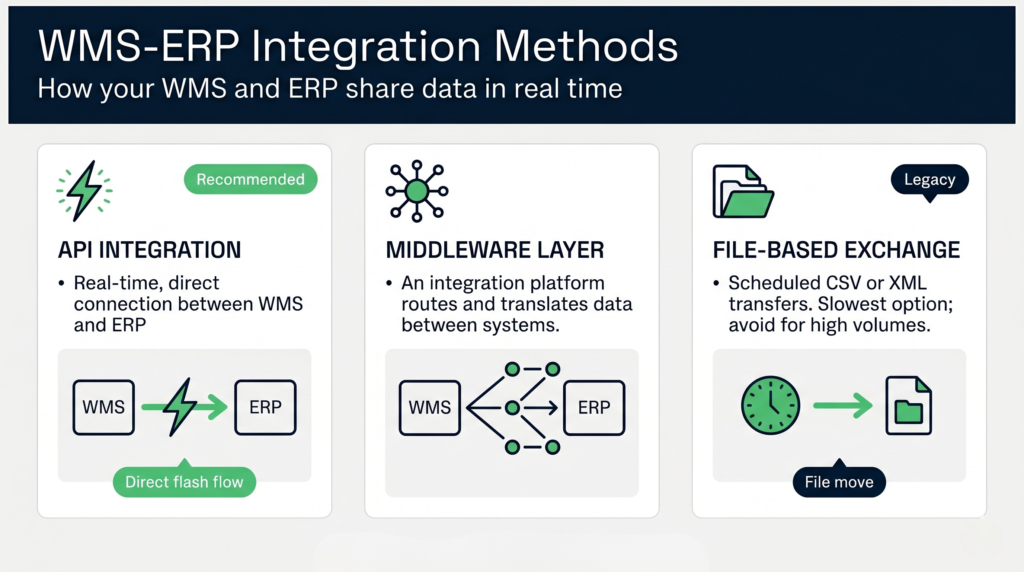
WMS and ERP integration typically works through one of three methods: direct API connection, middleware, or file-based exchange.
API integration is the modern standard. The WMS and ERP communicate in real time, passing orders, inventory updates, and fulfilment confirmations back and forth automatically. This is the approach Clarus WMS uses, with pre-built connectors available for the major ERP platforms including NetSuite, Sage, Microsoft Dynamics, and others.
Middleware uses an integration layer, sometimes called an iPaaS platform, to translate and route data between systems. This is common in enterprises with complex, multi-system environments where a single point-to-point connection isn’t enough.
File-based exchange uses scheduled imports and exports, typically in CSV or XML format. It’s the oldest method and the least desirable, since data is only as current as the last file transfer. For high-volume operations, this lag causes real problems.
Mecalux’s guide on WMS-ERP integration describes the typical data flows in detail: purchase orders flow from ERP to WMS; stock receipts, putaway confirmations, and shipment notifications flow back. When these feeds work in real time, your ERP always reflects what’s actually happening in the warehouse.
Choosing a WMS that integrates cleanly with your existing ERP is one of the most important decisions in the selection process. Our WMS implementation guide covers the integration planning process in full, including what questions to ask vendors before you commit.
Clarus WMS is designed to connect to any ERP rather than replace it. The system acts as the warehouse execution layer, while your ERP continues to handle finance, purchasing, and sales. Integration is handled through a well-documented API, meaning your IT team or implementation partner can connect to whichever ERP you run without needing to rip anything out.
ERP vs WMS: a side-by-side comparison
The table below summarises the key functional differences between a typical ERP warehouse module and a dedicated WMS.
| Capability | ERP warehouse module | Dedicated WMS |
|---|---|---|
| Stock quantity tracking | Yes | Yes |
| Bin/location-level control | Limited | Full |
| Directed putaway and picking | Rarely | Yes |
| Real-time mobile scanning | Often bolted on | Native |
| Optimised pick paths | No | Yes |
| Multi-client 3PL management | No | Yes (in purpose-built WMS) |
| Client billing automation | No | Yes (in purpose-built WMS) |
| Batch and serial number tracking | Basic | Advanced |
| Warehouse KPI dashboards | Limited | Full |
| Finance and procurement management | Yes | No (handled by ERP) |
The right answer for most scaling businesses isn’t to choose one over the other. It’s to use each system for what it does well and connect them properly. If you’re unsure which warehouse management software fits your situation, our guide on how to choose a WMS walks through the key evaluation criteria.
Choosing the right WMS to work alongside your ERP
Not all WMS platforms are equal, and the differences matter most when you’re integrating with an existing ERP. Here’s what to look for:
- ERP-agnostic architecture: The WMS should connect to any ERP rather than being locked to a specific vendor’s ecosystem. Vendor lock-in in either direction limits your flexibility as your business grows.
- Pre-built connectors or open API: Check whether the WMS vendor has a documented API and, ideally, ready-made connectors for your specific ERP. Custom integration built from scratch is expensive and fragile.
- Implementation speed: Some WMS platforms take six to twelve months to go live. Others, including Clarus, are designed for faster deployment without the enterprise overhead. Faster time to value matters when your warehouse has pressing problems.
- 3PL-native features: If you run a third-party logistics business, confirm the WMS handles multi-client billing, client reporting, and client portal access out of the box, not as a paid add-on.
- Ongoing support model: Find out what happens when you have a problem at 11pm on a Friday. Some vendors offer SLA-backed support. Others point you to a help centre article.
Some WMS vendors, including Mintsoft, position themselves primarily for e-commerce fulfilment environments. That works well for certain use cases, but if your operation includes complex putaway rules, multi-client 3PL billing, or regulated goods with traceability requirements, a more operationally deep platform is worth the comparison. Effective inventory and warehouse management at scale requires a system built for that complexity from the ground up, not one that grew from a simpler e-commerce background.
Clarus WMS is built specifically for 3PL and multi-client warehousing environments. It connects to your existing ERP rather than replacing it, handles client billing automation natively, and deploys faster than traditional enterprise WMS platforms. If you’re running a growing warehouse operation and your ERP’s warehouse module is holding you back, it’s worth a conversation.