

Warehouse computer software isn’t a nice-to-have anymore. It’s essential infrastructure that separates thriving 3PLs and distributors from those stuck in manual, error-prone workflows. If you’re managing a warehouse without dedicated software, you’re losing money every single day through mispicks, slow picking, inventory discrepancies, and wasted labour.
This guide covers everything you need to know about warehouse computer software: what it does, how to choose the right system, and why cloud-based solutions have become the go-to for forward-thinking UK logistics operations. Whether you’re running a small independent warehouse or a multi-site 3PL network, the right software transforms how you operate.
What is Warehouse Computer Software?
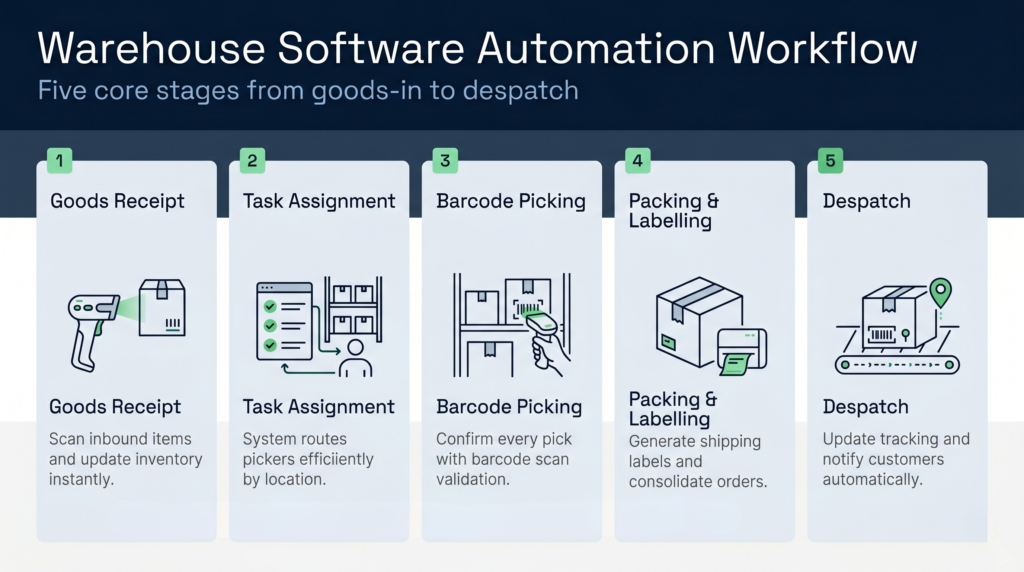
Warehouse computer software is a specialised application that manages the core activities inside a physical warehouse. It tracks inventory in real-time, routes stock movements, co-ordinates picking and packing, handles shipments, and integrates with shipping carriers and accounting systems. Think of it as the digital nervous system of your warehouse, orchestrating everything from goods receipt to despatch.
At its core, warehouse computer software does three things. First, it maintains an accurate, live inventory picture. Second, it automates task assignment so pickers, packers, and forklift operators work efficiently without queuing or duplication. Third, it captures data at every step, giving you complete visibility and audit trails. This is why it’s also called a warehouse management system, or WMS.
The software integrates with hardware including barcode scanners, mobile terminals, conveyor systems, and automated storage and retrieval systems (AS/RS). It’s this software-hardware combination that enables modern warehouses to operate at the speed and accuracy demanded by e-commerce, retail, and fast-moving logistics.
Why Warehouse Computer Software Matters for Your Business
Without proper warehouse computer software, you’re running blind. Here’s what typically goes wrong:
- Inventory inaccuracy: Manual counts drift from system records, leading to overselling, customer cancellations, and emergency stock movements.
- Slow picking and packing: Without task assignment, staff walk unoptimised routes, waste time searching for stock, and create bottlenecks.
- Poor customer service: You can’t tell customers exactly when their order will ship, or find out where a specific pallet is in your warehouse.
- Compliance failures: No audit trail means you can’t prove what happened to goods in your care, risking disputes and regulatory issues.
- High labour costs: Staff spend too much time on non-value work like searching for items or re-counting stock to reconcile discrepancies.
Warehouse computer software solves all of these. It cuts picking time by 20–40%, reduces mispicks from 2–3% to under 0.5%, and gives you real-time visibility into every SKU. For UK 3PLs managing multiple customer inventories, it’s the difference between being reliable and being risky.
Cloud-Based vs On-Premise Warehouse Software: Which is Right for You?
The cloud versus on-premise debate dominated warehouse software decisions a decade ago. Today, the pendulum has swung decisively toward cloud-based solutions, and for good reason.
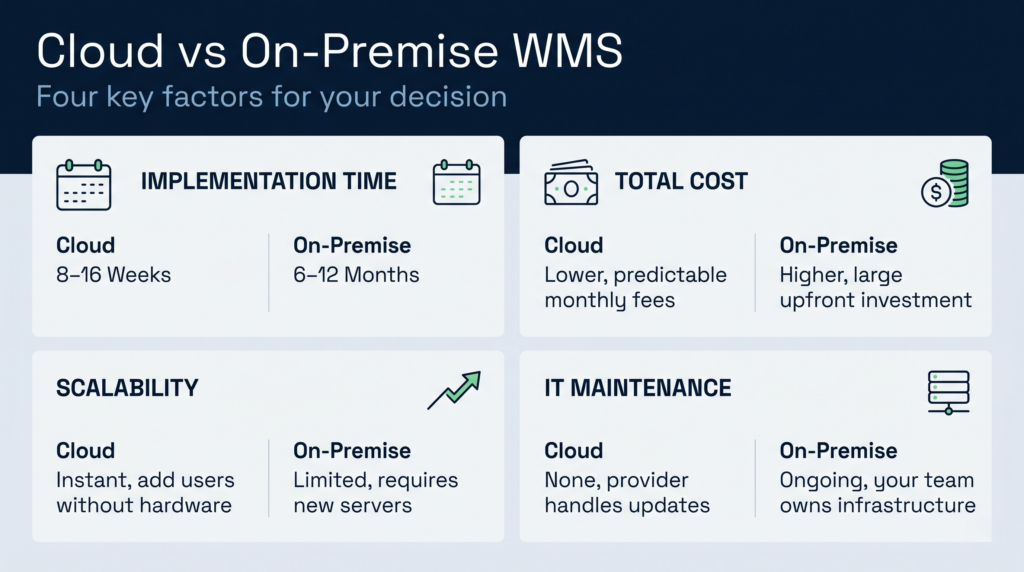
Cloud-Based Warehouse Software
Cloud warehouse software runs on servers hosted by the software company. You access it via your browser or mobile app from any device with an internet connection. No servers to maintain, no IT staff needed to manage patches or backups.
The advantages are substantial. Costs are predictable (monthly subscription), scaling is instant (add users without hardware purchases), and updates roll out automatically without disruption. You’re not locked into legacy systems; you can swap providers if needs change. For UK operations, cloud software also makes it simple to manage multiple sites or customer inventories in a single system.
The trade-off is internet dependency. A broadband outage disrupts your warehouse. That said, most modern cloud providers guarantee 99.9% uptime and have built-in offline modes for critical functions, so genuine downtime is rare.
On-Premise Warehouse Software
On-premise software runs on servers you own and operate inside your facility. Your IT team manages all maintenance, security, and upgrades. You own the software license outright.
The appeal is control and offline independence. If your internet goes down, you can still pick and pack using cached data. The downside is cost and complexity. On-premise systems demand significant upfront capital, ongoing IT investment, and skilled staff to manage infrastructure. They’re also slow to upgrade and inflexible if your business needs change.
The Verdict for UK 3PLs and Distributors
Cloud-based warehouse software has won for most UK operations, especially 3PLs. You get lower total cost of ownership, faster implementation, flexibility, and the ability to scale instantly when clients onboard new inventory. Cloud warehouse software is built for the modern, multi-customer warehouse environment. On-premise solutions make sense only if you have very complex integrations, unusually high uptime requirements, or regulatory constraints that prevent cloud use (rare in UK logistics).
What Hardware Does Warehouse Computer Software Need?
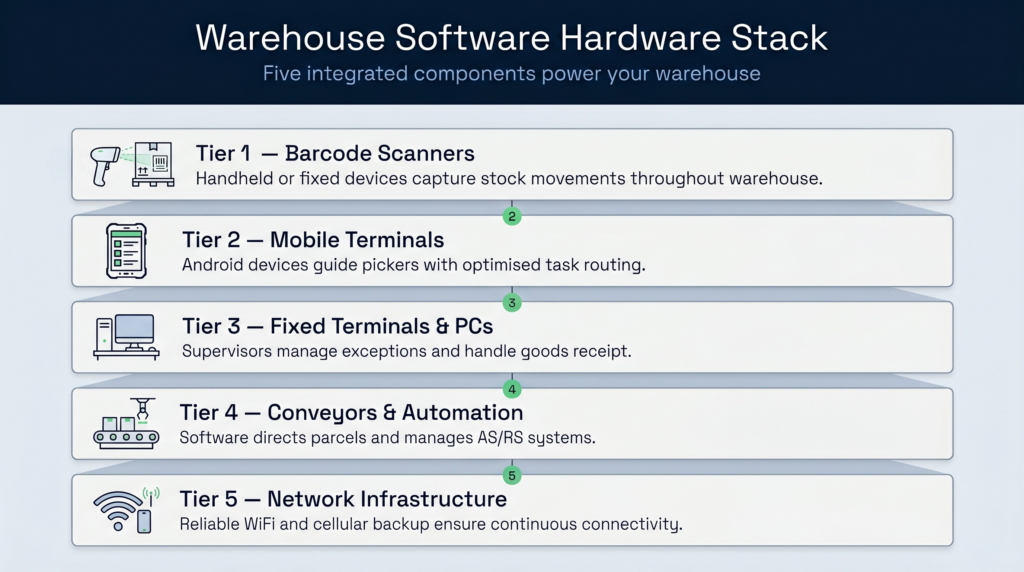
Warehouse computer software is only as good as the hardware it controls. Here’s what a modern warehouse typically uses:
Barcode Scanners
Handheld or fixed-mount scanners read barcodes on products, cartons, and pallets. This is how the software knows what’s physically being picked, packed, or received. Most modern scanners are wireless and integrate seamlessly with your WMS. You’ll need enough scanners that staff never queue to use one, typically one per picker plus spares.
Mobile Terminals and Tablets
Pickers and packers use mobile devices to receive tasks from the software. The system tells them which item to pick, from which location, in which order. This eliminates paper picking lists and human error. Modern terminals are rugged, long-battery Android devices or tablets designed for warehouse noise and impact.
Fixed Terminals and PCs
Supervisors, goods-in staff, and returns handlers use fixed terminals or PCs to receive goods, raise returns, or manage exceptions. These don’t need to be expensive; standard laptops or industrial PCs work fine.
Conveyor Systems and Automated Storage
Large operations often integrate conveyors or automated pick systems. The warehouse software drives these systems, directing parcels to the right packing station or requesting items from automated racks. This integration is where cloud WMS software excels because it can talk to multiple hardware vendors via APIs without forcing you into a single-vendor lock-in.
Network Infrastructure
You need reliable WiFi throughout your warehouse. Dead zones mean pickers lose connection, dropping tasks and creating confusion. Modern warehouse-grade mesh WiFi or cellular backup (4G/5G) ensures continuity. Cloud software handles brief connectivity blips gracefully with offline modes.
The good news is that warehouse hardware has become commodity. You’re not buying expensive proprietary systems anymore. Standard Android scanners, tablets, and network equipment work with modern warehouse computer software, keeping hardware costs reasonable.
How to Choose Warehouse Computer Software for Your UK Operation
Choosing the right system is a significant decision. You’ll live with this software daily for years, so selection matters. Here’s how to approach it:
Define Your Requirements
Start with your specific needs. Are you a single-site distributor or multi-site 3PL? Do you handle ambient, chilled, or frozen stock? Do you pick individual items or full pallets? Are your customers primarily B2B or e-commerce? Do you need cross-docking, kit assembly, or returns processing?
The better you define your requirements, the clearer your evaluation becomes. Avoid the trap of buying a system that’s “best in general” rather than best for your operation.
Evaluate 3PL-Native Platforms
Generic warehouse software is built for large retailers managing their own stock. 3PL-native platforms are designed from the ground up for multi-customer environments. They handle billing automation, customer-specific rules, inventory separation, and customer-facing portals out of the box.
If you’re a 3PL, this is crucial. A system not designed for your business model will require expensive customisation and workarounds. Seek platforms that make 3PL warehouse management their core strength, not an afterthought.
Check Implementation Speed and Support
Some warehouse software takes 6–12 months to implement. Others go live in 8–12 weeks. For UK operations where downtime costs money, implementation speed matters. Ask references how long their go-live took and whether they hit deadlines.
Also evaluate support quality. You need responsive, knowledgeable UK-based support that understands your business, not a helpdesk reading from a script in another time zone. Look for providers with local support teams and proven track records with similar-sized operations.
Verify Integration Capabilities
Your warehouse software must integrate with your accounting system, e-commerce platform, and shipping carriers. Ask how integrations are built (APIs, webhooks, middleware). Avoid systems that require custom development for every integration; modern platforms offer pre-built connectors to common tools like Shopify, Sage, DHL, and Royal Mail.
Review Reporting and Analytics
You need real-time dashboards showing stock levels, picking performance, error rates, and throughput. Can you drill down into issues, or does the system just show summary numbers? Look for systems that give you granular, actionable insights, not vanity metrics.
Consider UK-Specific Services
Choosing UK warehouse management services from a provider with UK operations has real advantages. They understand UK tax implications, Royal Mail integration, sector-specific regulations, and the business culture. Time zone alignment also means faster support responses.
Key Features of Modern Warehouse Computer Software
Not all warehouse software is created equal. Here are the features that matter:
Real-Time Inventory Tracking
Every stock movement updates the system instantly. This means your inventory figures are always accurate. No end-of-day counts, no month-end reconciliation disasters. You know exactly how much of each SKU is in which location.
Barcode Scanning Integration
From goods receipt through despatch, barcode scanning validates every step. When a picker scans a barcode, the system confirms they’ve picked the right item in the right quantity. This reduces picking errors to near-zero and eliminates the need for secondary quality checks.
Automated Task Assignment and Routing
The software routes pickers and packers efficiently, minimising walking time and cross-traffic. It prioritises tasks by shipping deadline or customer type. Staff spend less time thinking about what to do next and more time doing work. This alone typically cuts picking time by 20–30%.
Multi-Location Management
For 3PLs and larger distributors, the ability to manage multiple warehouses in one system is essential. You need visibility across all sites, the ability to reallocate stock between locations, and unified reporting. Look for systems that handle this without requiring separate instances or complex workarounds.
Customer-Facing Portals
Modern warehouse software includes web portals where your customers can check inventory levels, track shipments, and download documents. This reduces support queries and improves customer satisfaction. It’s especially valuable for 3PLs managing many customer accounts.
Integration with Shipping Carriers
Direct integration with Royal Mail, DHL, Evri, and other carriers automates label generation and tracking updates. Staff scan a barcode and the label prints automatically. No manual entry, no errors, no delays. The system pulls tracking data and updates customers automatically.
Comprehensive Reporting and Analytics
Beyond live dashboards, you need historical reporting on picking accuracy, throughput, labour productivity, and inventory turnover. Reports should be customisable so you can answer specific business questions without IT involvement. Some systems offer predictive analytics that flag slow-moving stock or upcoming overstock situations.
Warehouse Design and Layout Considerations
Warehouse software doesn’t operate in isolation. Your physical layout directly affects how efficiently the software can work. If your warehouse is poorly organised, no software will make it efficient.
Before implementing new warehouse computer software, evaluate your warehouse design and layout. Are fast-moving items located near the dispatch area or spread randomly across your building? Do you have dedicated receiving and despatch zones, or are they mixed in with general storage? Is your shelving optimised for the heights pickers can safely access?
The best warehouse software includes layout planning tools that show you how to organise stock for maximum picking efficiency. Some systems even use AI to recommend optimal storage locations based on picking patterns. Investing in software that helps you optimise your physical layout will yield returns for years.
Implementation and Getting Started
Moving to new warehouse computer software is a significant project. Here’s what success looks like:
First, choose a provider with proven UK implementation experience. Ask for references from similar-sized operations. Understand their go-live methodology and timeline upfront. The best implementations run in parallel for 2–4 weeks, with staff working both old and new systems, before switching completely.
Second, allocate internal resources. You’ll need a project lead who understands your operation and can make decisions quickly. Avoid the trap of treating the implementation as purely an IT project; it’s a business transformation that requires warehouse management buy-in.
Third, invest in training. Staff need to understand not just how to use the new software, but why it matters. When they see picking time drop and errors eliminate, they become advocates. Poor training leads to resistance and poor adoption, which dooms the project.
Finally, plan for optimisation. The first 3–6 months after go-live should include regular review meetings where you identify process improvements, customisations, and hardware additions that make the system work harder for you.
In Practice: The Clarus WMS Example
To see how these concepts function in real-world UK logistics, Clarus WMS serves as a clear example of modern, cloud-native warehouse computer software. Built specifically for multi-client 3PLs and growing distributors, the platform balances day-to-day floor operations with automated administrative management.
Key aspects of its approach include:
Native 3PL Architecture: It segregates individual customer inventories and automates activity-based billing (like tracking pallet storage days and picking fees), protecting 3PL margins without manual spreadsheet calculations.
Administrative AI: The platform utilises built-in AI tools to minimise office data entry, handling tasks such as extracting order data directly from customer PDFs or identifying unbilled warehouse tasks.
Agile Deployment: Operating on a multi-tenant SaaS model, it runs on standard Android scanners and connects to major UK carriers and e-commerce storefronts via pre-built APIs, avoiding heavy upfront IT infrastructure.