

In today’s ecommerce landscape, order tracking software has become non-negotiable. Customers demand real-time visibility into their shipments, and businesses need to deliver it without drowning in manual processes. Whether you’re running a 3PL operation or managing e-commerce orders at scale, the right order tracking software can transform your operations, reduce customer inquiries, and improve delivery performance.
But what exactly is order tracking software, and how does it fit into your warehouse and logistics ecosystem? This guide walks you through everything you need to know, from the fundamentals to choosing the right solution for your business.
What is Order Tracking Software?
Order tracking software is a system that monitors the movement of orders and shipments from warehouse to customer. It captures data at every stage: order placement, picking and packing, dispatch, transit, and final delivery. Customers can see where their package is, when it’ll arrive, and get proactive notifications if delays occur.
For warehouse and 3PL operations, order tracking software integrates with your fulfilment process. It captures barcode scans, GPS coordinates, delivery attempts, and signature proof. This real-time visibility flows back to your customer communication channels, reducing “where’s my order?” inquiries by up to 80%.
The best order tracking software doesn’t just tell customers where their parcel is. It gives warehouse teams the data they need to optimise picking routes, predict delivery windows accurately, and flag exceptions before they become customer complaints.
How Does Delivery Tracking Work in Warehouse Operations?
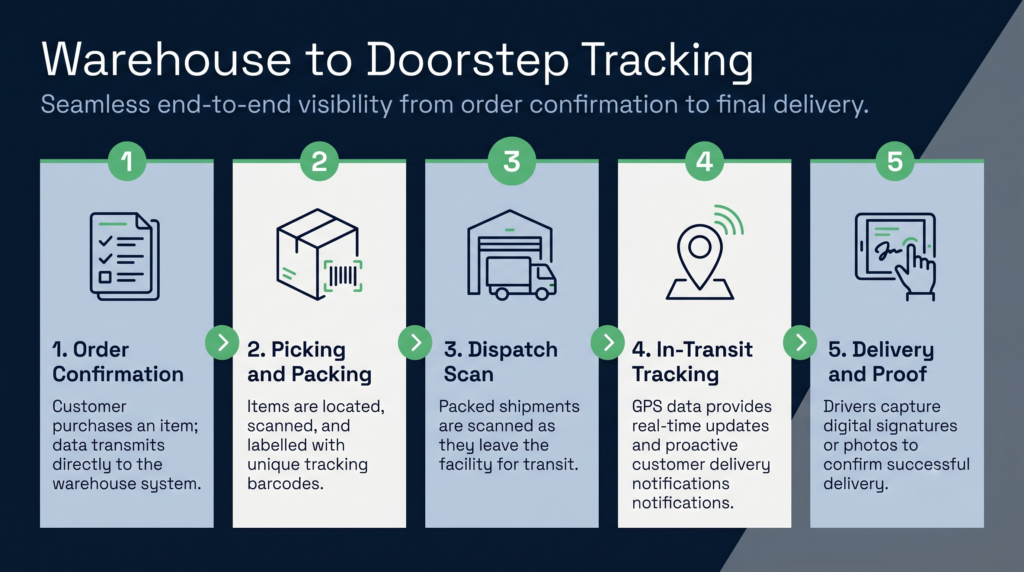
Delivery tracking starts in your warehouse. When an order is picked and packed, it’s scanned and assigned a tracking reference. As the package moves through your loading bay and onto the delivery vehicle, each stage is logged. The driver’s GPS provides real-time location data, which the system converts into estimated delivery windows and shares with the customer.
In practice, the workflow looks like this:
- Order confirmation: Customer buys a product; the order is transmitted to your warehouse system.
- Picking and packing: Warehouse staff locate items using batch or zone picking strategies (guided by your warehouse management system benefits and optimisations). Each item is scanned; the package is sealed and labelled with a tracking barcode.
- Dispatch scan: The packed shipment is scanned as it leaves the warehouse. Tracking data is pushed to the parcel carrier or your delivery fleet.
- In-transit tracking: GPS data and carrier scans update the tracking record. Customers receive proactive notifications (out for delivery, delayed, etc.).
- Delivery and proof: The driver scans the barcode on arrival, captures a photo or signature, and the order is marked delivered. The customer receives final confirmation.
The seamless flow from warehouse to doorstep depends on clean integrations. Your order tracking software must speak to your warehouse management system, your carrier or fleet management system, and your customer communication tools. Siloed data means delayed updates, frustrated customers, and manual workarounds.
What is Parcel Tracking Software and How Does It Differ from Order Management?
Parcel tracking software and order management systems are related but distinct tools. Understanding the difference helps you choose the right fit.
Parcel tracking software is a lightweight, customer-facing tool. It accepts a tracking number and shows the parcel’s location, estimated delivery, and proof of delivery. It’s typically provided by carriers (Royal Mail, DPD, Hermes) and integrated into ecommerce order management software features via APIs. Parcel tracking is reactive: the parcel is already in motion, and the customer is checking its status.
Order management systems are broader. They orchestrate the entire order lifecycle: from order placement through payment, fulfilment, inventory deduction, returns, and financials. An orders management system will include parcel tracking as one component, but it also handles order routing, fulfilment rules, carrier selection, and billing.
A 3PL order management system goes further. It assigns orders to the right warehouse based on stock location and carrier zones, automates pick paths to reduce labour, and integrates billing and proof of delivery for invoice reconciliation. It’s a complete fulfilment operating system, not just a tracking window.
The distinction matters: a parcel tracking tool won’t help you decide whether to ship an order from Manchester or London. An order management system will.
Ecommerce Order Management Software Features That Matter
When you’re evaluating ecommerce order management software, several features separate adequate systems from best-in-class solutions.
Real-time inventory visibility
Orders placed across multiple channels (website, marketplace, mobile app) must instantly reserve inventory. Without this, you’ll oversell stock and issue refunds post-fulfilment, damaging your reputation. The software should show available stock by warehouse location and reserve automatically when an order lands.
Multi-channel order routing
If you have multiple warehouses, you need rules that route orders intelligently: based on stock availability, geographic proximity to the customer, current warehouse load, or carrier discounts. Manual routing doesn’t scale. Dynamic routing reduces shipping costs and improves delivery speed.
Automated picking and packing
Wave picking, zone picking, and batch picking all improve efficiency. Your software should guide warehouse staff to the optimal pick path, reduce mis-picks through barcode confirmation, and batch orders by carrier to minimise label printing and dispatch handling.
Carrier integration
You shouldn’t print labels manually or re-enter tracking data. The software must integrate with major carriers (Royal Mail, DPD, DHL, Yodel, Evri) to auto-generate labels, validate addresses, and pull tracking updates in real time.
Customer communications
Order confirmation, dispatch notification, out-for-delivery alerts, and delivery proof all drive down support inquiries. The software should send these automatically via email and SMS, customisable by brand and language.
Returns and reverse logistics
ecommerce means returns. Your software should generate prepaid return labels, track returned parcels back to your warehouse, and trigger restock or inspection workflows. Without this, returns management becomes a bottleneck.
Analytics and reporting
You need visibility into on-time delivery rates, shipping costs per order, carrier performance, and customer satisfaction metrics. These dashboards inform your carrier negotiations and operational improvements.
Order Management for 3PL Providers: Specific Requirements
3PL businesses have unique demands. You’re managing inventory for multiple clients, enforcing client-specific fulfilment rules, and billing multiple revenue streams. Generic order management software rarely handles this complexity.
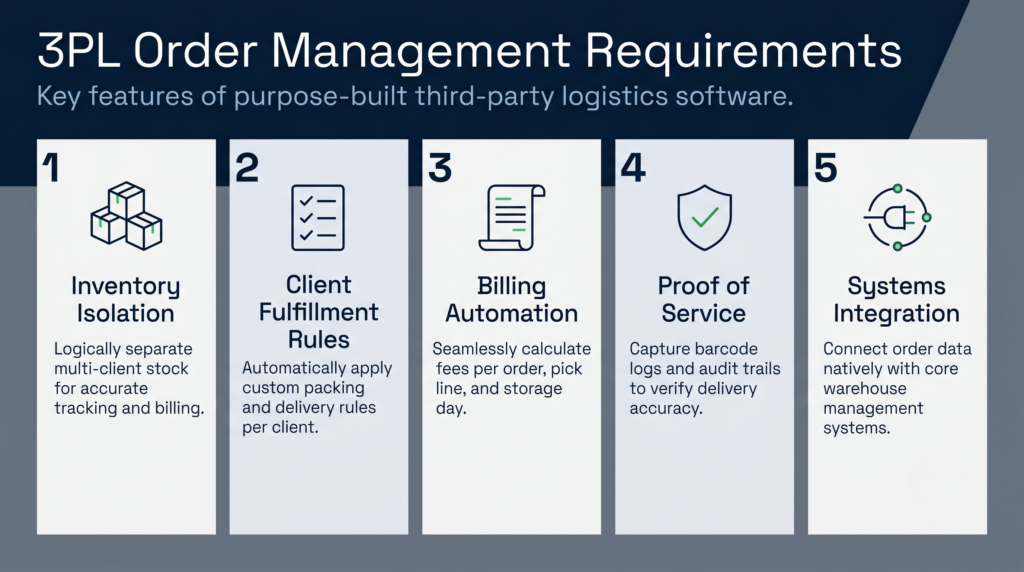
A purpose-built 3PL order management system handles:
- Multi-client inventory isolation: Each client’s stock is physically separated (or logically tracked) and never mixed in orders or counts. Billing is accurate and auditable.
- Client-specific fulfilment rules: One client requires two-day delivery; another needs white-glove packaging. The software applies rules per client without manual intervention.
- Billing automation: Charges accrue per order, per pick line, per storage day, per return processed. Invoice generation is automated and error-free, reducing disputes and speeding cash flow.
- Proof of service: 3PLs are liable for inventory and delivery accuracy. The system captures audit trails, barcode proof points, and GPS evidence to defend against claims.
- 3PL systems integration: Your warehouse management system must plug into a broader warehouse management system benefits ecosystem, including inventory management, inbound goods processing, and stock rotation protocols for perishable or aged stock.
Generic ecommerce order management software treats billing as an afterthought. 3PL software treats it as core. The cost of manual invoicing and client disputes far exceeds the premium for purpose-built systems.
Choosing and Implementing Order Tracking Software
Selection criteria should balance features, cost, and implementation speed. Here’s what to prioritize:
Integration depth
Does the software integrate directly with your warehouse management system and carrier APIs, or does it require manual data entry? Direct integrations eliminate errors and data delays. Ask vendors for their integration roadmap; a system with integrations for Sage, Microsoft Dynamics, and specialist warehouse platforms is far more flexible than one requiring custom development.
Scalability
Can the system handle your peak order volume without degradation? A system that works for 1,000 orders per day may struggle at 10,000. Ask about transaction limits, database architecture, and customer case studies at your scale.
Customer communication capabilities
Multi-channel notifications (email, SMS, WhatsApp, push) reduce inquiries. Check whether the software offers white-label branding so customers see your brand, not the vendor’s. Also verify delivery window prediction accuracy; vague estimates (“sometime Tuesday”) frustrate customers.
Cost model
Is pricing per order, per user, or per transaction? For high-volume operations, per-order pricing can balloon. Understand total cost of ownership, including implementation, support, and add-ons.
Vendor stability and support
Your order tracking system is mission-critical. Downtime means lost visibility and customer chaos. Choose a vendor with strong uptime guarantees (99.9%+), responsive support, and a roadmap of active development. Read customer reviews specifically about implementation and ongoing support.
Common Pitfalls and How to Avoid Them
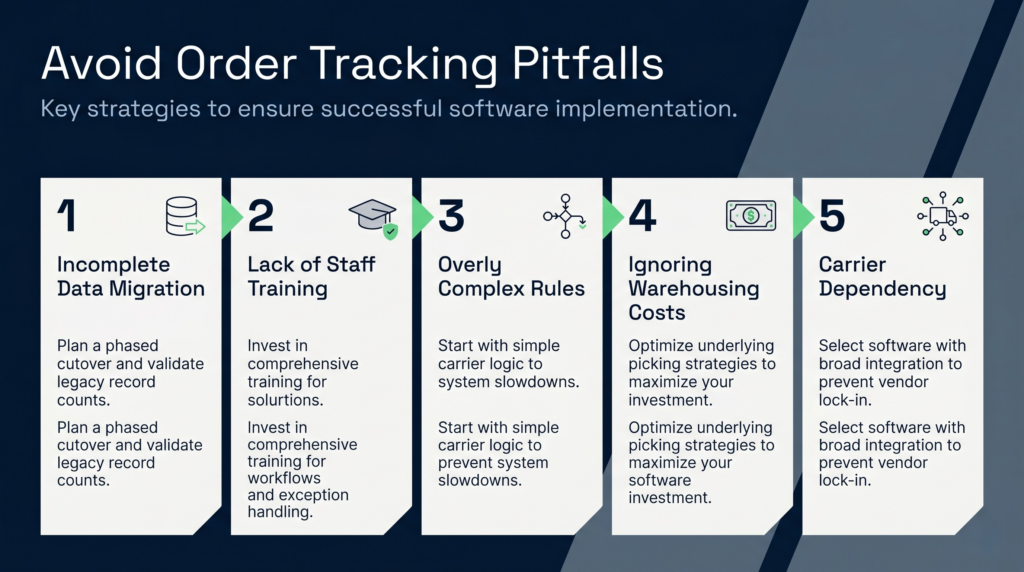
Even good software fails if implementation is poor. Watch out for these:
- Incomplete data migration: If legacy order data isn’t fully migrated, you’ll have tracking gaps. Plan a phased cutover and validate record counts before going live.
- Lack of staff training: Warehouse staff need to understand picking workflows and exception handling. Invest in training; a system is only as good as the people using it.
- Overly complex rules: Too many client-specific rules or carrier logic can slow the system and introduce bugs. Start simple; add complexity only when proven necessary.
- Ignoring the cost of warehousing: Order tracking software is one part of the warehouse economics picture. If you’re using inefficient picking strategies or poor stock rotation practices, tracking software won’t fix underlying cost problems. Understanding warehouse costs and optimisation techniques ensures your software investment pays off.
- Carrier dependency: If your software only integrates with one or two carriers, you’re locked in. Choose software with broad carrier support and the ability to switch without rebuilding workflows.
Powering Accurate Order Tracking with Clarus WMS
Ultimately, order tracking software is only as good as the data feeding it—which is exactly where Clarus WMS comes in. By acting as the central engine for your fulfilment, Clarus bridges the gap between warehouse activity and customer expectations. The exact moment a parcel is packed and dispatched, the system automatically captures the carrier details and unique tracking references, pushing this data instantly back to your e-commerce platform or order tracking software. This eliminates manual entry errors, cuts down on delivery exceptions, and ensures your customers receive immediate, accurate shipping updates. By seamlessly connecting back-end logistics with front-end tracking, Clarus transforms a potentially messy fulfilment cycle into a transparent, automated, and trust-building customer experience.