

Finding the best WMS for your warehouse isn’t as simple as picking the system with the most features or the biggest brand name behind it. The right warehouse management software depends entirely on what your operation actually does — how many clients you run, what channels you fulfil from, how fast you need to go live, and whether your team can absorb a six-month implementation project. This guide cuts through the noise to show you what separates a genuinely great WMS from an expensive one, and which operations each type of system suits best.
What makes the best WMS system?
A warehouse management system tracks inventory, directs warehouse tasks, and connects your operation to the wider supply chain. But the best WMS goes further than basic stock counting. It automates the repetitive work — pick and pack, goods-in processing, billing, reporting — so your team focuses on exceptions rather than admin. Before diving into specific products, it helps to understand what a strong system looks like in practice. If you’re starting from scratch on this question, our overview of what is a warehouse management system explains the core concepts clearly.
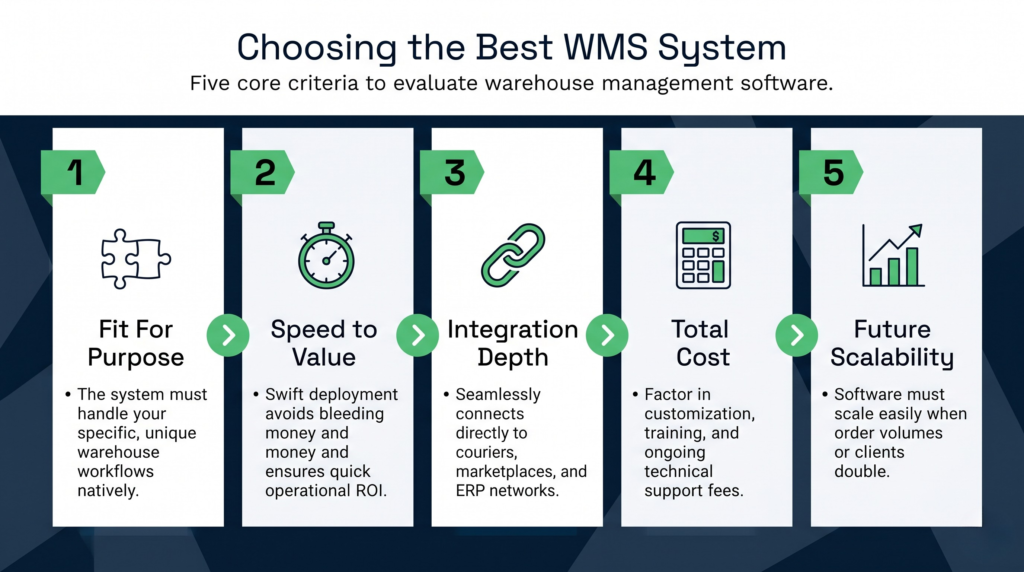
The most common factors buyers use to define “best” are:
- Fit for purpose: Does the system handle the specific workflows your operation runs? A food distributor needs lot control and expiry-date management. A 3PL needs multi-client separation and automated billing. A general-purpose WMS rarely excels at both.
- Speed to value: How quickly does the system go live and start delivering measurable benefit? Implementations that drag past six months bleed money and erode team confidence.
- Integration depth: Does it connect reliably to your couriers, marketplaces, ERP, and accounting package — or does it leave gaps you plug with spreadsheets?
- Total cost of ownership: The licence fee is only part of the picture. Factor in implementation, training, customisation, and ongoing support costs.
- Scalability: Can the system grow with you, or will you hit a ceiling when your client count or order volume doubles?
The global WMS market was valued at approximately USD 5.67 billion in 2025 and is projected to expand at a compound annual growth rate of 18.32% through to 2034, according to Precedence Research. That growth is being driven by cloud adoption, e-commerce volume, and the demand for real-time supply chain visibility — all of which raise the bar for what the best WMS software should deliver.
What are the top 5 WMS systems and how do they compare?
The 2025 Gartner Magic Quadrant for Warehouse Management Systems evaluated more than 80 providers and named seven as Leaders: Manhattan Associates, Blue Yonder, Oracle, SAP, Infor, Infios, and Made4net. These are powerful platforms, but “Leader” in Gartner’s methodology means ability to execute at enterprise scale — not suitability for every operation. Here’s an honest look at the most commonly shortlisted systems.
Manhattan Associates
Manhattan Active WM is a tier-one, cloud-native platform built for high-volume retail distribution and large omnichannel fulfilment centres. It integrates well with Manhattan’s Billing Management module, which makes it viable for 3PL at scale. The catch is the cost. Pricing starts at roughly $2,000 per user per year on custom quotes, and licence costs climb steeply alongside support and enhancement fees. Multiple reviewers on G2 flag that custom development is expensive and slow. If you run a smaller or mid-market 3PL, Manhattan may be overkill.
Blue Yonder WMS
Blue Yonder has been a Gartner Leader for 14 consecutive years, and its feature set reflects that pedigree. However, implementation is notoriously complex and typically takes three to six months even for straightforward deployments. Annual licence fees start at $100,000, and upgrade costs — described by reviewers as “frequent, expensive, and unavoidable” — add significant ongoing burden. The system’s reporting is also flagged as difficult to customise, which frustrates 3PLs who need client-level visibility baked in. Blue Yonder suits enterprise logistics networks rather than growing fulfilment businesses.
Oracle Warehouse Management Cloud
Oracle has held a Gartner Leader position for ten consecutive years. Oracle Warehouse Management Cloud handles multi-site, multi-client scenarios and offers strong barcode, RFID, and wave-processing capabilities. The limitations that come up repeatedly in Gartner Peer Insights reviews include a steep learning curve, long implementation timelines, difficulty integrating with non-Oracle systems, and the absence of a real-time inventory API — a significant gap for e-commerce operations. Oracle works best when your business is already deep in Oracle’s ecosystem.
Mintsoft
Mintsoft positions itself as a WMS for UK 3PLs and e-commerce fulfilment houses, and its 150+ carrier and marketplace integrations are genuinely useful. Where it falls short is in full warehouse operations: users on Software Advice report “obsolete workflows, unreliable performance,” and support described as slow with canned replies. The platform relies heavily on CSV uploads for tasks that competitors automate, and reviewers flag cluttered navigation and limited multi-client billing sophistication. It’s adequate for a small operation focused almost entirely on e-commerce orders, but struggles when 3PL complexity grows.
Clarus WMS
Clarus WMS is a cloud-native platform purpose-built for 3PL, multi-client fulfilment, and growing UK logistics operations. Unlike the enterprise systems above, Clarus is designed to go live fast — typically in weeks rather than months — and delivers the specific tools 3PLs need from day one: multi-client inventory separation, automated client billing, a branded client portal, and real-time reporting. Implementation doesn’t require a specialist consultant or a significant IT project, which keeps total cost of ownership genuinely competitive. The platform also supports warehouse inventory management across bonded, ambient, and cold-chain environments.
What is the best WMS for 3PL operations?
Third-party logistics is the most demanding WMS use case. You’re not just managing your own stock — you’re managing multiple clients’ stock simultaneously, each with different SKUs, SLAs, billing structures, and reporting requirements. A system that works well for a single-client warehouse will buckle under that complexity.
The best WMS for 3PL needs to handle these non-negotiables:
- Multi-client inventory separation: Each client’s stock must be fully segregated, with no risk of cross-contamination between accounts, even in the same physical zone.
- Automated billing: Manual charge capture is one of the biggest revenue leaks in 3PL. The WMS should automatically record storage fees, handling charges, packing fees, and transport costs against each client account.
- Client portal access: Clients expect real-time visibility of their stock, order status, and movements. A good portal reduces inbound queries and builds trust.
- Flexible SLA management: Different clients have different cut-off times, carrier preferences, and pick-and-pack rules. The system must enforce these at the task level without manual intervention.
- Multi-channel order intake: 3PLs fulfil from multiple channels — EDI, API, CSV, manual entry — often for the same client. The WMS must handle all of them cleanly.
Our dedicated 3PL management system page goes deeper on the architecture and workflows that matter most for third-party logistics providers. The short version: a general-purpose WMS adapted for 3PL is rarely as effective as one built for it from the ground up.
Tap’in 3PL, a Clarus WMS customer, moved from paper-based and manual processes to a fully automated cloud WMS. The result was a significant shift in how the team spent their time — away from administrative tasks and toward value-adding work, with improved scalability and the ability to take on new clients without adding headcount. Mitchell Storage and Distribution (MSD) similarly saw email volume drop by 60% and nearly eliminated time spent chasing stock information after implementing Clarus, alongside tight Sage 50 integration that automated invoicing.
What WMS does Amazon use?
Amazon uses a proprietary warehouse management system built entirely in-house, often referred to internally as Amazon Warehouse Management System or AWMS. It’s deeply integrated with Amazon’s broader fulfilment and robotics infrastructure and is not available as a commercial product. The sophistication of Amazon’s system — including AI-driven slot optimisation, robotic picking, and real-time demand forecasting — is partly why mid-market 3PLs and fulfilment houses can’t simply replicate the Amazon model by buying off-the-shelf enterprise software. What you can do is adopt a WMS that applies the same principles — automation, real-time inventory, algorithmic task assignment — at a scale and cost that actually makes sense for your business.
Key features to look for in the best WMS software
Beyond the 3PL-specific requirements above, these features separate a genuinely capable WMS from one that just looks good in a demo.
Real-time inventory visibility
Stock levels, locations, and movements should update instantly. Batch-update systems introduce lag that causes overselling, lost pallets, and customer complaints. Real-time data also underpins accurate client reporting — critical when your 3PL clients expect live dashboards rather than end-of-day email updates.
Directed task management
The system should tell your warehouse team what to do and in what order, based on rules you configure — not leave them deciding for themselves. This covers directed putaway, wave planning, pick routing, and replenishment. Directed work reduces errors and makes throughput consistent regardless of which staff member is on shift.
Barcode and mobile scanning
Every goods movement should be confirmed by scan, not keyboard entry. Mobile devices — RF scanners or smartphones running a WMS app — are the standard delivery mechanism. Scan confirmation at receiving, putaway, pick, pack, and despatch closes the loop on inventory accuracy.
Integrations with your tech stack
Your WMS doesn’t operate in isolation. It needs to connect to your couriers for label generation and tracking, your marketplaces for order intake, your ERP or accounting package for invoicing, and potentially your clients’ own systems. Check what the WMS integrates with natively, what requires custom development, and what’s genuinely not possible.
Reporting and analytics
Good reporting tells you what happened. Great reporting tells you why and what to do next. Look for configurable dashboards, client-level performance reports, and the ability to export data in formats your team actually uses.
Scalability and multi-site capability
If you plan to grow — more clients, more SKUs, more sites — your WMS needs to grow with you. Check whether adding a new client, a new warehouse, or a new workflow requires expensive customisation or just configuration.
Best WMS by operation type: matching the system to the business
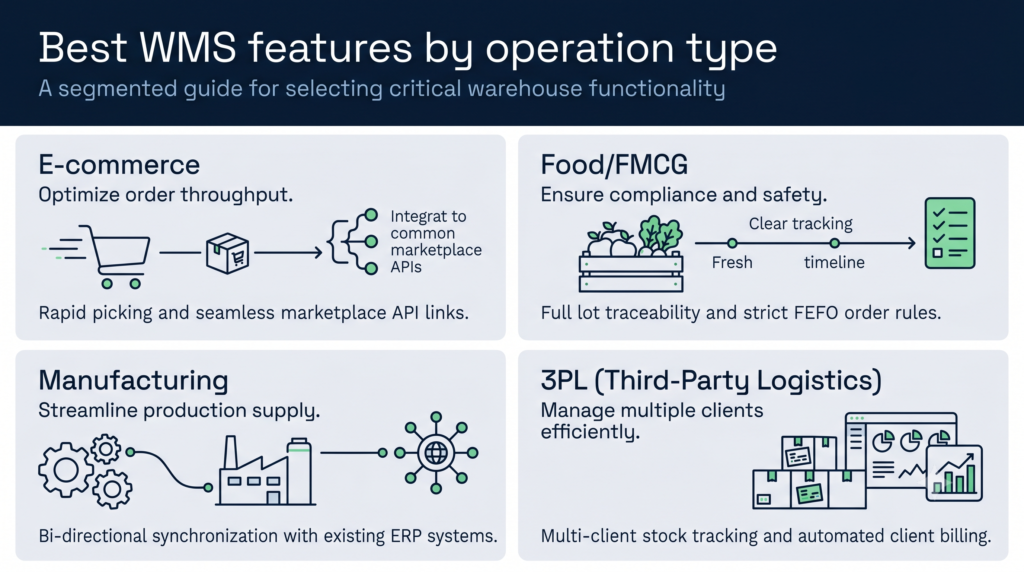
No single system is the best WMS for every operation. The right fit depends heavily on your vertical.
Best WMS for e-commerce fulfilment
E-commerce operations need high-speed order processing, carrier-rate shopping, returns management, and seamless marketplace integrations. The volume of small, individual orders demands efficient pick routing and packing workflows. Multi-channel warehouse management — handling orders from Amazon, eBay, Shopify, and direct channels simultaneously — is table stakes. Systems with pre-built integrations to major marketplaces and couriers have a significant advantage here over platforms that require custom connector builds.
Best WMS for food and FMCG
Food logistics requires lot tracking, FEFO (first-expiry-first-out) pick rules, temperature zone management, and full traceability from goods-in to despatch. Regulatory compliance — particularly for bonded stock or imported goods — adds another layer. A WMS without native lot and expiry tracking forces workarounds that introduce error. Check that any system you consider handles this natively rather than through add-on modules.
Best WMS for manufacturing
Manufacturers often need WMS functionality alongside production scheduling and raw-material management. In some cases, the ERP’s built-in warehousing module (SAP EWM is a common example) handles both. The trade-off is that ERP warehouse modules tend to be less operationally focused than standalone WMS platforms — better at data capture than at directing physical warehouse work.
Best WMS for best WMS for 3PL operations specifically
As covered earlier, 3PL needs multi-client architecture as a foundation, not a bolt-on. If a WMS doesn’t show you how it handles multiple client accounts in a single warehouse as a core feature, treat that as a warning sign. For a structured view of how to evaluate warehouse management software across these dimensions, our guide to choosing a warehouse management system provides a practical framework.
How to choose the best WMS for your business
The evaluation process matters as much as the product shortlist. Here’s a practical approach that avoids the most common mistakes.
Start with your pain points, not the feature list. What is actually going wrong in your warehouse today? Inventory inaccuracy? Billing errors? Poor client visibility? Slow onboarding of new clients? Your WMS evaluation should test whether each system solves those specific problems — not whether it has the most impressive feature matrix.
Define your non-negotiables early. If you need Sage integration, automated billing, or a specific carrier connection, confirm those are available before investing time in a full demo. Many implementations stall because a critical integration turns out to be custom work.
Ask about implementation, not just the product. How long does go-live actually take? Who manages the project — your team, a consultant, or the vendor? What does support look like post-launch? These questions reveal as much as the software demo.
Run a real scenario in the demo. Ask the vendor to walk through your most complex workflow — a multi-client order, an automated billing run, a returns process — with real data, not a canned script. This exposes gaps that polished presentations hide.
Evaluate total cost of ownership. Licence fees, implementation fees, integration development, training, ongoing support, and upgrade costs all count. A system that looks cheaper upfront may cost significantly more over three years. Our WMS implementation guide walks through the full process, including how to build a realistic budget.
Why Clarus WMS stands out for 3PL and multi-client fulfilment
Clarus WMS was built from the ground up for 3PL and multi-client fulfilment — not adapted from a single-client platform after the fact. That architectural difference shows up in the day-to-day: client accounts are truly separate, billing is automated at the task level, and the client portal is included as standard rather than sold as an add-on.
Implementation speed is another genuine differentiator. While enterprise platforms like Blue Yonder or Oracle can take three to twelve months to go live, Clarus implementations typically complete in weeks. That’s partly because Clarus doesn’t require specialist consultants or complex customisation to handle standard 3PL workflows — they’re configured, not coded.
The platform also handles best wms systems requirements across multiple operation types within the same deployment. A Clarus client running ambient, bonded, and temperature-controlled bays from one site manages all three under a single system instance, with appropriate controls for each environment.
For operations considering whether Clarus fits alongside existing systems, the platform integrates with major couriers (Evri, DPD, Royal Mail, Parcelforce, and others), leading e-commerce platforms, and accounting packages including Sage. That pre-built connectivity removes one of the most common implementation headaches.
Hardy Distribution, a family-run logistics business in Northern Ireland with over 25 years of experience, chose Clarus WMS after recognising that their existing system couldn’t support their growth ambitions. Clarus became their first cloud WMS deployment and positioned them for the next phase of expansion.