

Warehouse teams evaluating their next warehouse management system frequently encounter NetSuite WMS during their research. It is the embedded WMS module within Oracle NetSuite’s ERP platform, and for businesses already running NetSuite as their core business system it represents a convenient option. However, convenience and capability are not the same thing — and for operations with complex warehousing needs, particularly third-party logistics providers, the distinction matters considerably.
The global warehouse management system market is projected to grow from USD 4.57 billion in 2025 to USD 10.04 billion by 2030, at a compound annual growth rate of 17.1% (Source: MarketsandMarkets). Within the UK, the WMS market was valued at approximately USD 179.9 million in 2024 and is forecast to grow at a CAGR of 16.4% through to 2030, reaching USD 375.2 million (Source: PS Market Research). Growth on this scale reflects a surge in demand for sophisticated warehouse processing capability — demand that an ERP add-on module may not fully satisfy.
This guide answers the most common questions about NetSuite WMS: what it is, how much it costs, how it compares to purpose-built alternatives, and when a dedicated system is the smarter long-term investment.
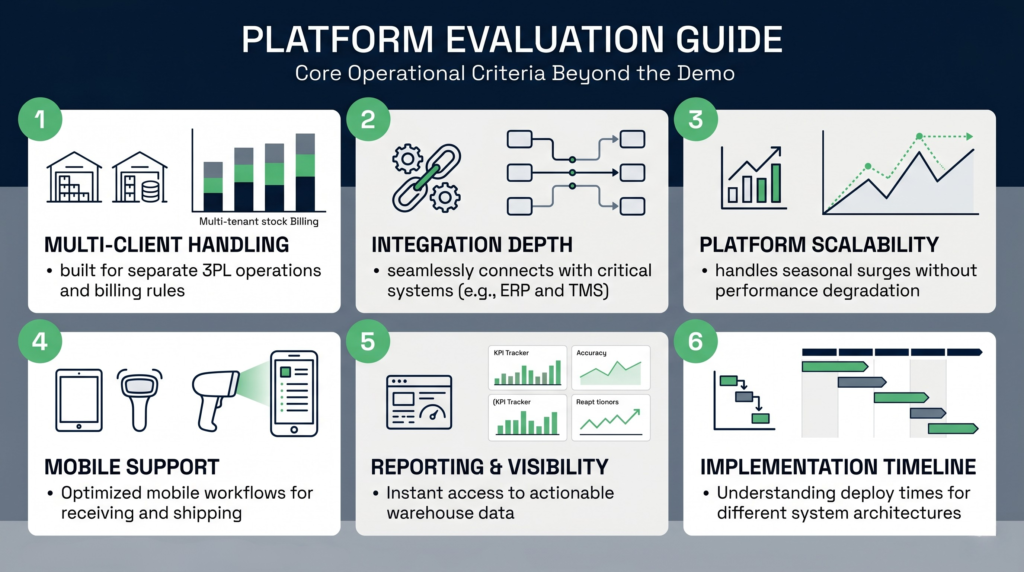
Does NetSuite have a WMS system?
Yes, NetSuite does include a warehouse management module. It is not a standalone warehouse management system but rather a licensed add-on to the NetSuite ERP platform, meaning it is only available to businesses that already subscribe to NetSuite. The module extends the ERP with warehouse-specific workflows layered on top of NetSuite’s existing inventory and fulfilment records.
NetSuite WMS is designed to optimise day-to-day warehouse operations using capabilities including mobile RF barcode scanning, put away and pick strategies, wave release management, task management, return authorisation receipts, and cycle count plans. Staff use handheld Android or iOS devices to scan barcodes as goods are received, moved, and dispatched, with inventory records updating in real time within the NetSuite platform.
What does NetSuite WMS actually include?
The module’s functional scope covers the following warehouse processing activities:
- Inbound operations: mobile-guided receiving, put away strategies by bin, zone, and item classification
- Inventory management: real-time bin-level tracking, lot and serial number capture, multi-location inventory
- Outbound fulfilment: single- and multi-order picking, wave release, pack-and-ship workflows, carrier label printing
- Cycle counts: planned count schedules by zone or ABC classification to maintain inventory accuracy without full physical stocktakes
- Returns processing: return merchandise authorisation (RMA) receipts linked back to original orders
- Mobile RF scanning: Android and iOS device support for all scanning tasks across the warehouse floor
For a full technical overview of the module’s configuration options, Oracle’s NetSuite WMS online help documentation covers setup, bin management, and advanced fulfilment workflows in detail.
Is NetSuite WMS a native WMS or an ERP module?
This is an important distinction. NetSuite WMS is fundamentally an ERP module rather than a natively built warehouse management system. A warehouse management system is purpose-engineered around warehouse processes from the ground up. An ERP module adapts existing ERP data structures — items, locations, transactions — to accommodate warehouse workflows. The consequence is that the ERP’s architecture shapes what is possible in the warehouse, rather than the other way around. For straightforward single-client warehouse operations this is often sufficient. For complex, multi-client, or high-volume environments the constraints become apparent.
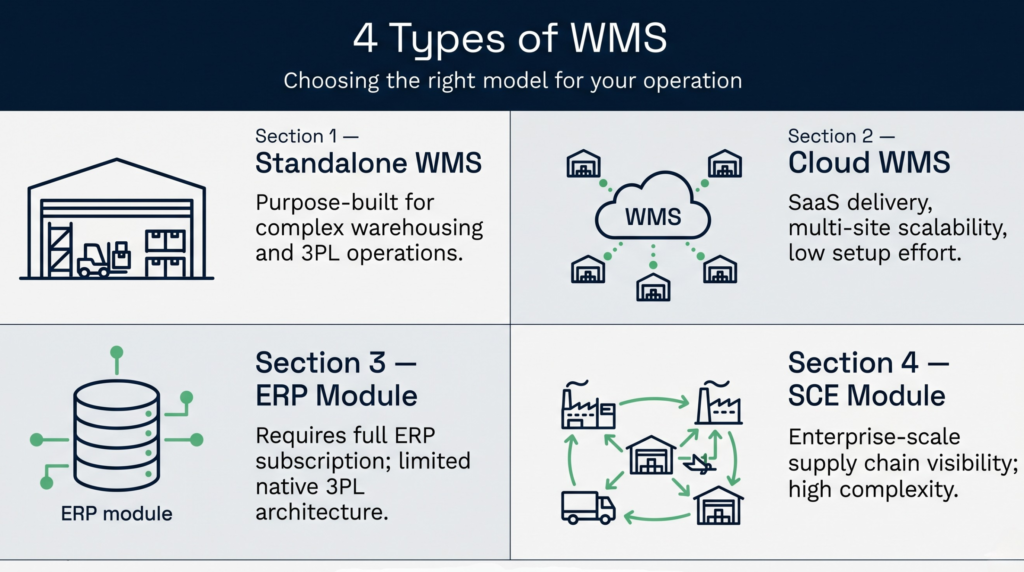
What are the four types of WMS?
There are four recognised types of warehouse management system, and understanding them is essential when evaluating any vendor’s offering, including NetSuite. The four types are: standalone WMS, cloud-based WMS, ERP-integrated WMS modules, and supply chain execution (SCE) modules. Each occupies a different position on the spectrum between deep warehouse specialisation and broad enterprise integration.
1. Standalone WMS
A standalone warehouse management system operates independently of other business applications. These systems are engineered exclusively around warehouse and distribution centre requirements, which typically means more advanced functionality in areas such as labour management, slotting optimisation, advanced wave management, and multi-client support. Because they are not constrained by an ERP’s data model, standalone systems often handle edge cases and operational complexity more gracefully. The trade-off is that integration with ERP, accounting, and order management systems requires deliberate connector work.
2. Cloud-based WMS
Cloud-based WMS solutions are delivered as software-as-a-service (SaaS) hosted in public or private cloud infrastructure. They are well suited to businesses operating across multiple sites or geographies, as all users connect to a single centralised system. Cloud deployment eliminates on-premise server maintenance and allows vendors to push updates continuously — a meaningful operational advantage over legacy on-premise deployments. Many modern standalone WMS platforms are cloud-native by design, combining the depth of a purpose-built system with the accessibility of SaaS delivery.
3. ERP-integrated WMS modules
ERP-integrated WMS modules — of which NetSuite WMS is the most prominent example — bolt warehouse management capability onto an existing ERP platform. The primary advantage is consolidated data: orders, inventory, financials, and warehouse transactions share the same database without the need for integration middleware. This appeals to businesses that have already committed to a single ERP vendor and want to minimise the number of systems in their technology stack. The limitation is that the WMS functionality is constrained by the ERP’s underlying architecture and the vendor’s prioritisation of warehouse features relative to the broader product roadmap.
4. Supply Chain Execution (SCE) modules
SCE modules sit within broader supply chain management platforms that span warehousing, transportation management (TMS), order management, and vendor collaboration. They provide end-to-end supply chain visibility and are typically deployed by large enterprises with complex, multi-tier distribution networks. SCE solutions are the most powerful but also the most expensive and complex to implement, generally suited to organisations with dedicated supply chain IT teams.
| WMS Type | Best suited for | 3PL multi-client support | Implementation complexity |
|---|---|---|---|
| Standalone WMS | Dedicated warehouses, 3PLs, DCs | Strong — purpose-built | Medium |
| Cloud-based WMS (SaaS) | Multi-site, growing operations | Strong — scalable by design | Low to medium |
| ERP module (e.g. NetSuite WMS) | Existing NetSuite ERP users | Limited — not purpose-built for 3PL | Medium to high |
| SCE module | Large enterprise, multi-tier supply chains | Varies by vendor | High |
How much does NetSuite WMS cost
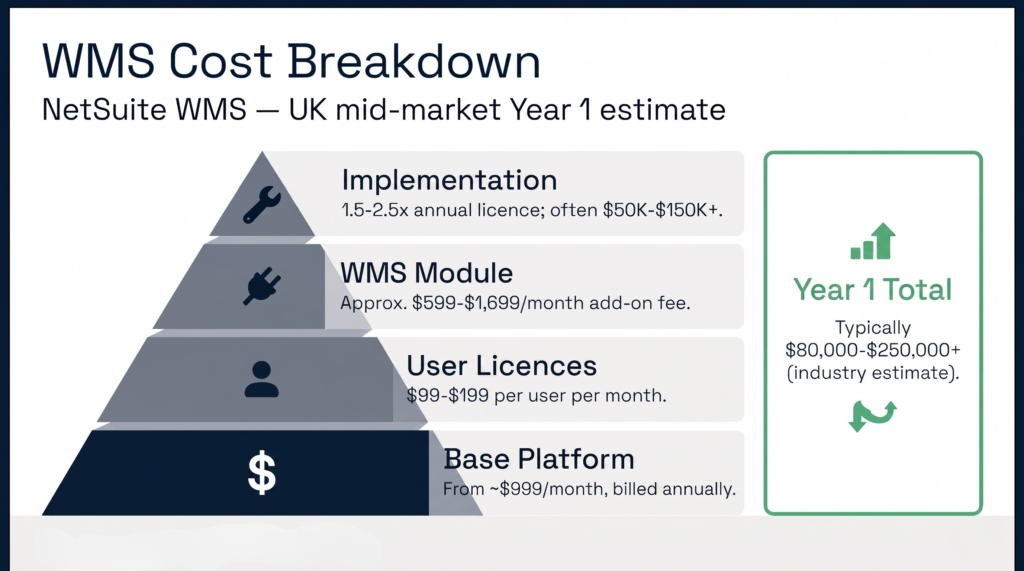
NetSuite WMS does not have a fixed published price. The cost is made up of multiple components — base platform licence, user licences, the WMS module subscription, and implementation fees — all of which are negotiated individually. In practice, a mid-market business should expect a total first-year investment ranging from $50,000 to well over $150,000 once implementation, customisation, and training are factored in.
Licence and module costs
The NetSuite base platform starts at approximately $999 per month, billed annually. The WMS module itself is priced as an add-on, with NetSuite module pricing generally ranging from approximately $599 to $1,699 per month depending on functionality tier and negotiation. For UK buyers, NetSuite’s EMEA partner ecosystem is smaller than in the US, which historically reduces competitive pricing pressure and means UK implementation rates tend to run higher (Source: Threadgold Consulting).
Implementation costs
Implementation is where the total cost of NetSuite WMS becomes significant. Businesses should budget for implementation services at 1.5-2.5 times the annual licence fee, with hourly consulting rates typically between $150 and $350. For a warehouse operation with any meaningful complexity — multiple bin zones, wave picking, carrier integration — implementation timelines routinely extend to six months or longer. When currency conversion, VAT, and UK partner margins are applied, the effective first-year outlay for a mid-market UK 3PL could potentially reach $150,000-$250,000 (industry estimate; source: Clarus WMS analysis).
The hidden cost: NetSuite dependency
NetSuite WMS is only available to NetSuite ERP subscribers. A business that does not already run NetSuite must adopt the entire ERP platform before accessing the WMS module. This dependency transforms a warehouse software decision into a full ERP migration — a considerably larger undertaking in terms of cost, resource, and organisational change. For 3PLs and warehouse operators whose clients use a variety of ERP systems, this constraint is particularly limiting: a NetSuite WMS deployment requires the 3PL to standardise on NetSuite internally while still integrating with external client systems separately.
For a practical breakdown of what WMS implementation involves regardless of vendor, our WMS implementation guide outlines the key stages, risks, and planning considerations.
What is the best WMS for NetSuite?
For businesses deeply embedded in the NetSuite ecosystem, the native WMS module is often the default choice — but it is not necessarily the best. Several third-party WMS platforms are specifically built to integrate with NetSuite and offer deeper warehouse functionality without the constraints of the ERP module architecture. The right answer depends on operational complexity, whether the business operates as a 3PL, and how many warehouse sites need to be managed.
When the native NetSuite WMS module is sufficient
The built-in module works well when the warehouse operation is relatively straightforward: a single warehouse, a single client, moderate order volumes, and no requirement for dedicated client portals or multi-client billing. For a manufacturer or distributor already running NetSuite who needs basic RF scanning, put away strategies, and cycle count management within a unified ERP system, the native module avoids integration complexity and additional vendor relationships.
When a third-party WMS integration is the better route
As supply chain scale and complexity grow — particularly across multi-site, multi-client, and automation-driven environments — many organisations find the limits of an ERP-embedded WMS model. Complex wave release rules, carrier-specific packing logic, and multi-client 3PL scenarios push towards the edges of what the module handles cleanly out of the box. In these situations, a purpose-built WMS integrated with NetSuite via API typically outperforms the native module on warehouse-specific functionality.
RF-SMART is among the most widely cited NetSuite-specialist WMS extensions. RF-SMART for NetSuite extends the native module with enhanced mobile workflows, advanced scanning logic, and tighter process control, while remaining within the NetSuite data environment. It suits businesses that want to stay within the NetSuite ecosystem but need more granular warehouse process control than the standard module provides.
The 3PL question: why the native module falls short
For third-party logistics providers, the limitation of NetSuite WMS is structural rather than incidental. Multi-client 3PL operations require a system that can segment inventory, billing, reporting, and customer portals by client — and maintain strict data isolation between them. The NetSuite WMS module is not architected for this. Its native 3PL connectors rely on batch-based data synchronisation, meaning inventory records may only refresh every 15 minutes to an hour, creating fulfilment lag and accuracy risks for high-volume 3PLs. Client users also face restrictions on inventory visibility — for example, the inability to view zero-inventory items without running a stock status report — which can create friction in client-facing operations.
For a fuller comparison of what to look for in warehouse management software and how to evaluate vendors objectively, our guide on how to choose a warehouse management system sets out a structured evaluation framework.
Where does NetSuite WMS struggle in practice?
NetSuite WMS performs reasonably well within its design parameters — a single-entity business already using NetSuite ERP, with moderate warehouse complexity. Outside those parameters, consistent operational challenges emerge across the following areas.
Multi-client 3PL support
Third-party logistics providers managing inventory on behalf of multiple clients need native multi-client architecture: separate billing, per-client reporting, client-branded portals, and strict inventory segregation. NetSuite WMS was not built with this architecture in mind. Implementing genuine multi-client separation typically requires custom SuiteScript development, which increases both implementation cost and ongoing maintenance burden. This contrasts with purpose-built 3PL management systems designed from the ground up to handle multi-client complexity without customisation.
Batch synchronisation delays
NetSuite’s built-in connectors offer batch-only data synchronisation for many integration scenarios, queuing order updates and inventory changes for periodic refresh rather than true real-time transfer. For high-volume operations or businesses with time-sensitive fulfilment SLAs, this introduces lag that can erode inventory accuracy and delay despatch confirmation. Resolving this requires custom integration development, adding further cost and complexity.
Automation hardware integration
Operations incorporating conveyor systems, automated storage and retrieval systems (ASRS), or goods-to-person robotics frequently find that native NetSuite WMS integration with these hardware layers requires significant custom development. Purpose-built WMS platforms built specifically for automated warehouses tend to offer more mature hardware connectors and vendor-supported integrations out of the box.
Cycle count management at scale
A robust cycle count programme — where warehouse teams continuously count rotating sections of inventory to maintain accuracy without a full physical stocktake — is a core warehouse processing discipline. Effective cycle counting targets 99% or higher inventory accuracy (Source: Extensiv). While NetSuite WMS does support cycle count plans, the scheduling flexibility, count zone configuration, and exception workflow management that large or complex warehouses require is less developed than in leading standalone systems. Our guide to inventory and warehouse management covers the cycle count methods and accuracy targets operations should be planning towards.
Cost and lock-in risk
The total cost of ownership for NetSuite WMS is anchored to the total cost of NetSuite ERP. Any future decision to migrate to a different ERP — or to reduce NetSuite user licences — directly affects WMS access. This lock-in dynamic is a material risk for growing businesses whose technology requirements may evolve faster than a monolithic ERP contract allows.
Ready to compare your options?
Choosing the right warehouse management system is one of the most consequential technology decisions a warehouse or logistics business will make. If your operation manages inventory on behalf of multiple clients, or if you need genuine real-time warehouse processing visibility without the overhead of a full ERP implementation, a purpose-built system is almost always the more effective long-term investment.
Clarus WMS is a cloud-native warehouse management system built specifically for 3PL and multi-client warehouse environments. It provides the multi-client architecture, real-time inventory visibility, client-facing portals, and billing automation that 3PLs require — without requiring adoption of an ERP platform. Implementation is measured in weeks, not months, and the system scales alongside growing client volumes without requiring custom development for core 3PL workflows.
If you are evaluating NetSuite WMS alongside alternatives, or if you are currently using NetSuite and finding the WMS module’s limitations are creating operational friction, we would welcome a conversation. Book a demo with Clarus WMS to see how a purpose-built system handles the scenarios that ERP modules typically struggle with.