

If you’re running a warehouse, 3PL operation, or managing multiple distribution centres, you know the chaos of manual stock tracking. Lost orders, overstocking, stockouts, and expensive manual counts drain your budget and frustrate customers. Inventory management system software solves this problem by automating stock control, improving visibility, and cutting operational costs.
In this guide, we’ll explore what inventory management system software is, how it works, the different types available, and how to pick the best solution for your UK business. Whether you’re a small retailer or a large 3PL provider, the right software can transform how you manage inventory.
What Is Inventory Management System Software?
Inventory management system software is a digital tool that tracks stock levels, movements, and locations in real time. It replaces spreadsheets and manual counting with automated systems that monitor inventory across your warehouse, multiple sites, or sales channels.
Think of it as the nervous system of your warehouse. Instead of staff manually checking shelves, writing down numbers, and updating spreadsheets, the software knows exactly what you have, where it is, and when it needs replenishing. This real-time visibility prevents stockouts, reduces overstocking, and cuts the time spent on stock takes from days to minutes.
For 3PL providers and multi-site operators, inventory management system software becomes even more critical. You’re managing stock for multiple clients across different locations. Manual processes simply don’t scale. The right software keeps each client’s inventory accurate, separate, and compliant.
How Does Inventory Management Software Work?
Modern inventory management system software works in layers. At the core is a central database that stores all your stock data. When someone picks an item, scans a barcode, or receives a delivery, the system updates automatically.
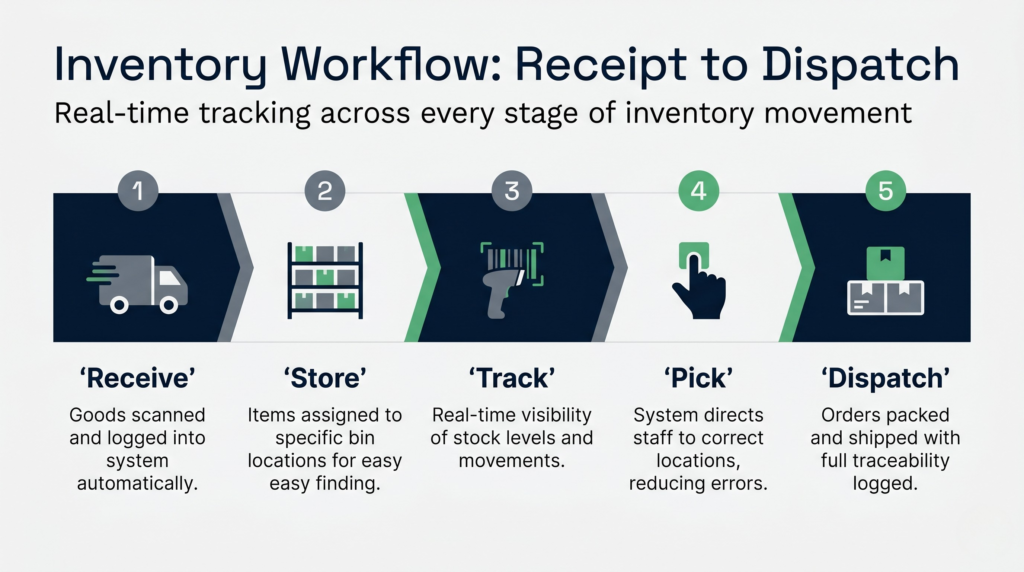
Here’s the typical workflow:
- Receive goods: When stock arrives, the software records it into the system via barcode scan or manual entry.
- Store and track: Items are assigned locations (bin numbers, shelves, aisle positions). The software knows exactly where every SKU lives.
- Pick and dispatch: When an order comes in, the software directs staff to the correct location, reducing picking time and errors.
- Monitor levels: The system tracks stock in real time. When levels drop below a threshold, it triggers reorder alerts.
- Analyse and report: You get dashboards showing stock turnover, slow-moving items, and demand patterns.
Many modern systems integrate with accounting software (like Xero or Sage), sales channels, and purchase order systems. This integration means your inventory, finances, and sales stay in sync without manual data entry.
For businesses using a cloud WMS software solution, the system runs on remote servers, meaning you access it from anywhere and don’t need expensive on-site hardware.
The 4 Types of Inventory Management System
Inventory systems come in different flavours, each suited to different business models. Understanding which type fits your operation is crucial.
1. Manual Inventory Systems
This is the spreadsheet era. Staff record stock movements on paper or in Excel. It’s cheap to start but becomes unwieldy as your business grows. Errors are common, data is out of date, and stock takes are tedious.
2. Perpetual Inventory Systems
This system updates stock records continuously as inventory moves. Every receipt, pick, and adjustment updates the central database in real time. This is the standard for most modern retail and warehouse operations. It gives you visibility instantly and catches discrepancies early.
3. Periodic Inventory Systems
Stock is counted at set intervals, like monthly or quarterly. Popular in smaller businesses or those with slower stock turnover. The downside: you won’t notice stock shortages until the next count. Not ideal for fast-moving retail or 3PL.
4. ABC Inventory Analysis Systems
This approach categorises stock by value and turnover. A-items (high value, fast-moving) get frequent counts and tight control. B-items get moderate attention. C-items (low cost, slow-moving) are checked less often. This system balances accuracy with cost, especially useful if you stock thousands of SKUs.
Most UK businesses today use a combination of perpetual systems (for core stock) with ABC analysis to focus effort where it matters most.
Real-Time Visibility and Stock Control
One of the biggest benefits of modern inventory management system software is real-time visibility. No more waiting until the end of the day to know what sold or what’s in stock.
With live dashboards, you see:
- Current stock levels: Exactly how many units you have across all locations.
- Stock locations: Which bin holds which SKU, speeding up picking and reducing errors.
- Reorder points: Automatic alerts when stock falls below your minimum threshold.
- Movement trends: Which items are selling fast and which are collecting dust.
- Expiry tracking: For perishables or goods with shelf lives, the system flags items nearing expiry so you sell them first.
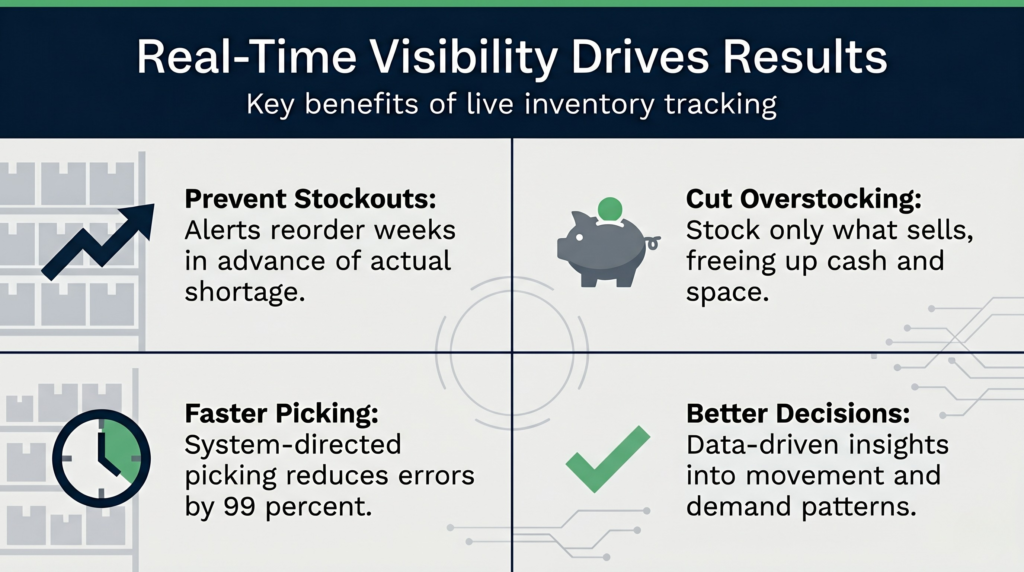
This visibility cuts down stockouts. Instead of discovering you’ve run out when a customer orders, the system alerts you weeks in advance to restock. It also reduces overstocking. You see exactly what’s moving, so you stop ordering excess stock that ties up cash and warehouse space.
For 3PL operations managing inventory across multiple clients, inventory turnover ratio tracking helps you optimise space and improve client SLAs. The software shows you which clients’ stock is moving fast and which is aging, informing decisions about storage, handling, and pricing.
Purchase Orders and Inventory Integration
Purchase orders are where inventory planning meets procurement. Good inventory management system software bridges these two functions seamlessly.
Here’s how integration works in practice:
- Forecasting: The system analyses past demand and seasonality to recommend when and how much to order.
- PO automation: Based on reorder points, the system can generate purchase orders automatically or flag them for approval.
- Supplier tracking: You track orders in transit, expected delivery dates, and compare actual receipt against the PO.
- Invoice matching: When goods arrive, the system matches the receipt to the PO and invoice, catching discrepancies before you pay.
- Cost tracking: You see your inventory value, carrying costs, and how price changes affect profitability.
This integration prevents the costly mistakes that happen when POs and inventory systems don’t talk. You don’t order stock you already have, you catch short shipments immediately, and you’re not paying for goods that never arrived.
Choosing the Best Inventory Management Software for Your UK Business
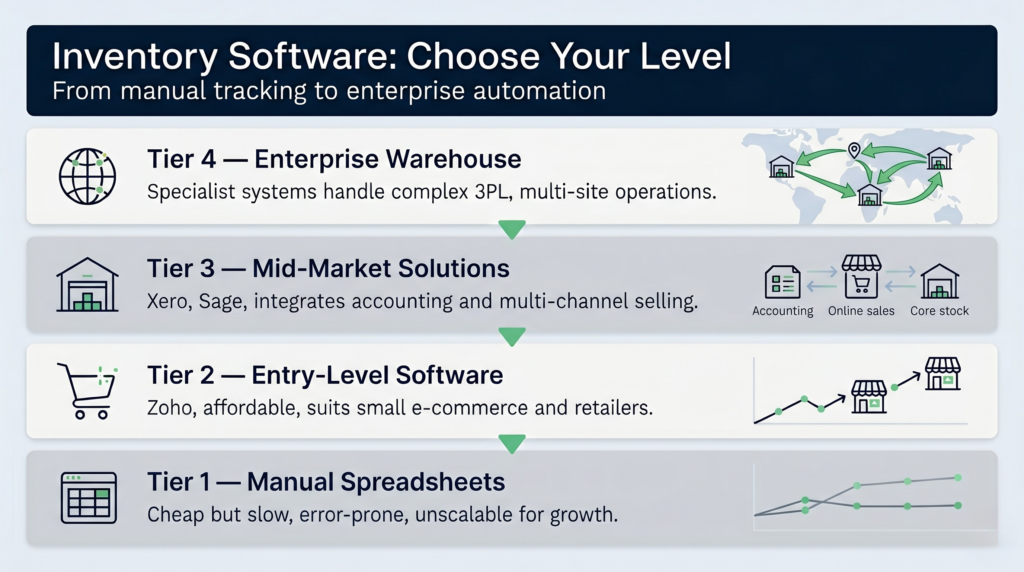
The market is crowded. You’ve got budget solutions like Zoho Inventory, accounting-linked systems like Xero Inventory and Sage Inventory, and specialist warehouse solutions. How do you choose?
Start by defining your needs:
- Scale: Are you managing 100 SKUs or 50,000? Do you have one location or ten?
- Integration: Does the software link to your accounting system, e-commerce platform, or ERP?
- User count: How many staff need access? Will you need mobile apps?
- Reporting: What KPIs matter most to you? Stock turnover, cost of goods, ageing analysis?
- Support: Do you need a local provider or is remote support fine?
For small e-commerce businesses, Zoho or Xero work well. They’re affordable, integrate with common sales channels, and don’t require specialist knowledge. For larger retailers or 3PL providers, you’ll need something more robust.
Specialist solutions built specifically for warehouse and 3PL operations, like purpose-built warehouse management solution platforms, handle complexity that generic software struggles with. They manage complex multi-client scenarios, billing automation, and sophisticated reporting that accountants’ software simply doesn’t cover.
Industry comparison sites like Capterra’s inventory management directory let you filter by size, industry, and price. PCMag’s inventory software reviews offer independent ratings and side-by-side comparisons.
Understanding Warehouse Costs and ROI
Inventory software has an upfront cost, but the ROI typically arrives within 6 to 12 months. How? Through reduced labour costs, fewer picking errors, lower carrying costs, and better cash flow.
Manual stock counts take time. A team of three might spend two days counting a medium warehouse twice a year. That’s 48 labour hours. Cycle counting (counting small sections daily) with automated software takes a fraction of that time. Over a year, you save thousands in labour alone.
Picking errors are expensive. Every mispick costs money in returns, restocking, and reputational damage. Software-directed picking (where the system tells staff exactly where to go) cuts errors by 99%. That directly improves your margins.
Overstocking ties up cash. Every pound in excess stock is money not available for operations. Software reveals what’s actually selling, so you stop ordering slow movers. That frees up cash and warehouse space.
Understanding your warehouse costs is essential. Rent, utilities, staff, and equipment are your biggest expenses. Software reduces inefficiency across all of these. It also helps you understand what stock you’re holding relative to your available space, informing decisions about expansion or consolidation.