
Running a small retail business means juggling dosens of tasks at once. You’re managing stock, processing payments, tracking customer orders, and trying to keep everything organised without breaking the bank. That’s where retail software for small business comes in. The right tools transform chaos into clarity, cut your admin time by half, and help you scale without hiring extra staff.
But here’s the challenge: there’s no one-size-fits-all solution. A POS system alone won’t cut it once you open a second location. Spreadsheets stop working the moment you exceed a few hundred SKUs. And choosing between dedicated retail management software, inventory tracking, or even a warehouse management system can feel overwhelming.
This guide walks you through everything you need to know about retail software for small business. We’ll explore what systems do, how they differ, when you actually need to upgrade, and how to pick the right combination for your growth stage.
What Retail Software Does a Small Business Need?
The software you need depends on your operation’s complexity. Most small retailers start with one or two core systems and add more as they grow.
Point of Sale (POS) System
A POS system is your checkout. It processes sales, records transactions, and collects customer data. For small retailers with one or two locations, a modern cloud-based POS like Square’s retail POS solution handles payment processing, receipts, and basic sales reports. It’s affordable, easy to set up, and doesn’t require an IT team to run.
Inventory Management Software
Inventory software tracks what you have in stock, alerts you when items run low, and prevents overselling. It syncs with your POS so every sale automatically updates your stock count. For a small business retail management software approach, tools like Sage’s retail management suite combine POS and inventory in one platform, saving time on data entry.
Accounting and Financial Tools
You need visibility into profit margins, tax obligations, and cash flow. Many POS systems integrate with accounting software to pull sales data automatically. Others use separate tools like Wave or Xero to handle invoicing and reporting.
Warehouse Management (When You Scale)
Once you have multiple locations or exceed 500 SKUs, a dedicated warehouse management system becomes invaluable. A proper WMS automates picking and packing, optimises stock location across multiple warehouses, and ensures you’re following stock rotation rules correctly. This is where what is a WMS becomes relevant to your retail operations.
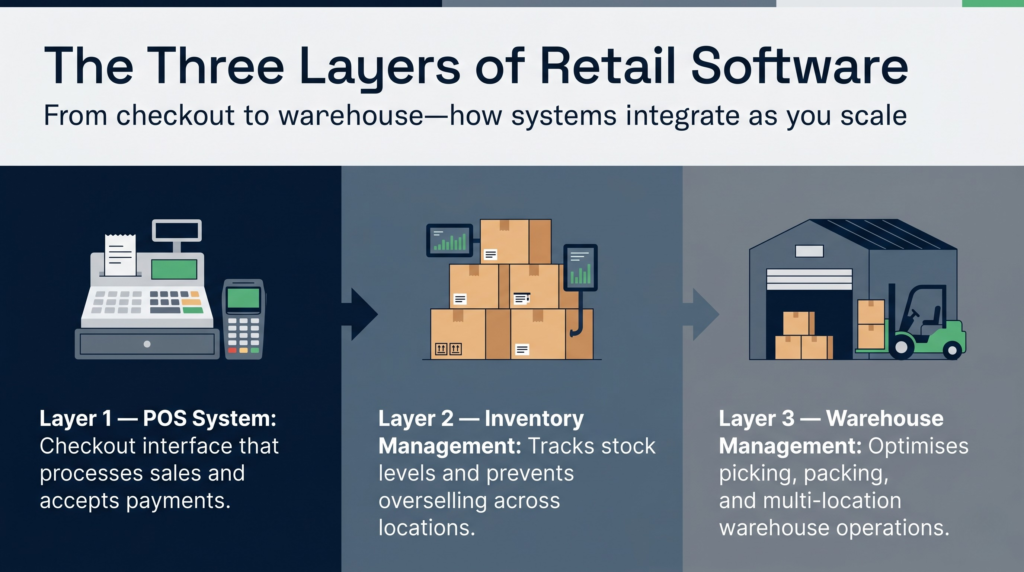
POS vs Inventory Management vs WMS: What’s the Difference?
These three layers serve different purposes, and confusion between them costs small retailers thousands in wasted stock and operational inefficiency.
POS System
A POS is the checkout interface. It’s where your staff rings up sales, takes payments, and generates receipts. Most modern POS systems include basic stock updates, but they don’t optimise warehouse operations or multi-location logistics.
Inventory Management Software
Inventory software goes deeper. It tracks stock levels across locations, sets reorder points, generates purchase orders, and provides analytics on what’s selling. Best retail POS systems for small businesses often bundle inventory features alongside the checkout function.
Warehouse Management System
A WMS is the operating system for your warehouse or distribution centre. It controls where products are stored, automates picking and packing, manages returns, and optimises inventory turnover ratio across multiple locations. WMS software may be overkill in some cases for a single-location retailer but essential once you operate multiple warehouses or fulfil orders at scale.
How They Work Together
Think of it this way: your POS is the front end (customer-facing), inventory software is the middle layer (stock visibility), and a WMS is the back end (warehouse operations). For most growing retailers, you start with a POS + inventory combo, then add a WMS once you have multiple locations or a dedicated warehouse operation.
How Much Does Retail Software Cost for Small Businesses?
Budget varies wildly based on what you buy and how many users you need. Here’s a realistic breakdown.
POS Systems
Cloud-based POS systems typically cost £60–300 per month depending on features and transaction volume. Payment processing for small businesses and POS systems often includes card processing fees (1.5–2.9% per transaction) on top of the software subscription.
Inventory Management Software
Dedicated inventory tools range from £30–200 per month for small businesses. Some charge per user, others per location. Budget an extra £50–100 monthly if you integrate with your POS system.
Warehouse Management Systems
WMS pricing depends heavily on deployment model. A cloud-based WMS typically costs £500–3,000 per month for small operations, plus implementation and training. That sounds steep, but it pays for itself through reduced picking errors, faster order fulfilment, and better stock accuracy. Clarus WMS pricing is transparent and scalable based on your warehouse throughput.
Hidden Costs to Factor In
- Integration fees: Connecting systems often requires middleware or custom development.
- Training: Staff need to learn new software; budget for onboarding.
- Data migration: Moving from spreadsheets or legacy systems takes time and sometimes costs.
- Support: Premium support plans cost extra but save headaches when things break.
Most small retailers spend £150–400 monthly on retail software once they’ve scaled beyond a single location.
When Should a Small Retailer Move from Spreadsheets to Dedicated Software?
Spreadsheets feel free, but they’re a false economy. Here’s when it’s time to upgrade.
You’re Losing Track of Stock
If you can’t tell at a glance how many units you have or where they’re stored, you’re leaving money on the table. Spreadsheets don’t update in real time. A customer buys the last black shirt in size M at your London location while you’re ordering 50 more from the supplier. By the time you realise the mistake, you’ve ordered stock you don’t need.
Manual Data Entry Is Consuming Hours
If your team spends 5+ hours per week updating spreadsheets, you need software. One staff member’s salary pays for years of inventory software.
You’re Opening a Second Location
Managing stock across two locations in spreadsheets is nearly impossible. You need a central system that shows real-time stock at each site and prevents overselling.
You’re Making Costly Mistakes
Ordering duplicate stock, overselling items, or miscounting at stocktake all point to spreadsheet weakness. Even one £2,000 wasted order pays for three years of software.
You Want Better Reports
Spreadsheets don’t give you insights. Dedicated retail software for small business shows you which products drive profit, seasonal trends, and customer buying patterns. That data helps you make smarter purchasing decisions.
How Do POS Systems Integrate with Inventory and Warehouse Software?
A good POS doesn’t stand alone. It needs to talk to your inventory system and, eventually, your warehouse software.
The Flow: POS to Inventory
Every sale at the POS instantly reduces your inventory count. No manual updates needed. If you’re using quality retail POS system small business software, it syncs stock across all locations in real time.
Inventory to Purchasing
When stock drops below a reorder point, your inventory system can automatically notify you or even generate a purchase order. This prevents stockouts and reduces the time you spend on ordering admin.
Inventory to WMS
Once you operate a warehouse, your inventory system talks to the WMS. The WMS sees incoming stock, assigns storage locations, and optimises picking routes. Clarus integrations work seamlessly with most inventory and POS platforms, so you don’t have to rebuild your entire stack.
The Key: API Integration
Look for software that uses modern APIs (application programming interfaces). APIs allow systems to communicate without manual intervention. Avoid tools that require you to export and re-import data manually—it’s slow, error-prone, and defeats the purpose of upgrading.
How to Choose the Best Retail Software for Your Business
There’s no perfect solution, but there is a right fit for your operation. Use these criteria to narrow your search.
Match Your Current Needs, Plan for Growth
Don’t buy for where you are today. Buy for where you’ll be in two years. If you’re planning to open a second location, you need inventory software that handles multiple sites. If you’re hitting order volumes of 100+ per week, you’ll want a WMS eventually.
Prioritise Integration
Your systems must talk to each other. Before choosing software, check whether it integrates with your POS, accounting tool, and any other systems you use. Broken integrations create double work.
Test Before You Commit
Most vendors offer a free trial. Use it. Have your team test it for a week. If they hate it, it won’t get used, regardless of how powerful it is.
Check the Support
Good software + bad support = frustrated team. Look for vendors who offer training, responsive customer support, and regular product updates. Features of the best retail software for small businesses include accessible customer support during your busiest trading hours.
Understand Scalability
Will the tool grow with you? Can you add users, locations, and SKUs without hitting a hard ceiling? Can you eventually connect a warehouse management system?
Building Your Software Stack: A Practical Example
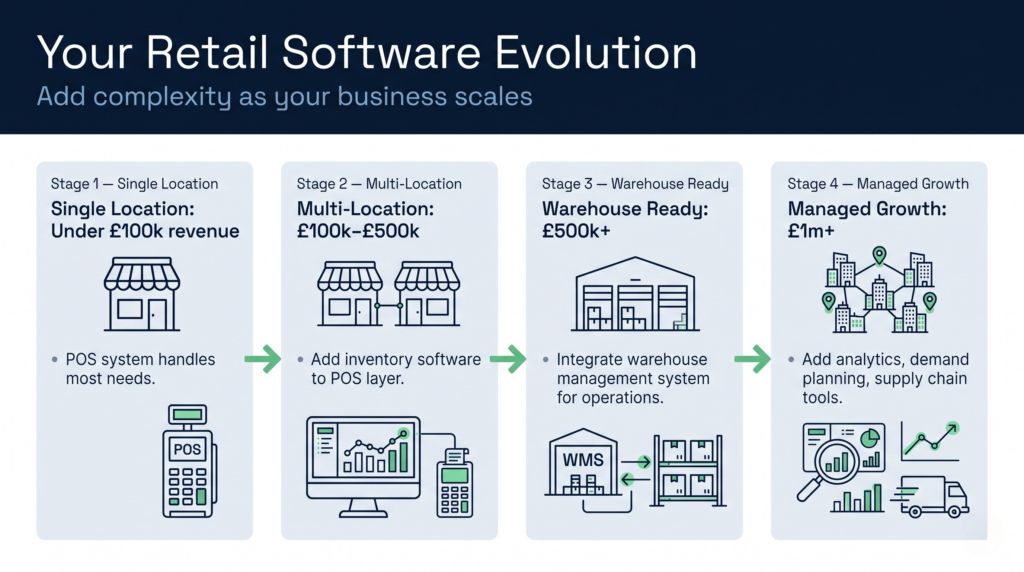
Here’s how a typical small retailer scales their software as they grow.
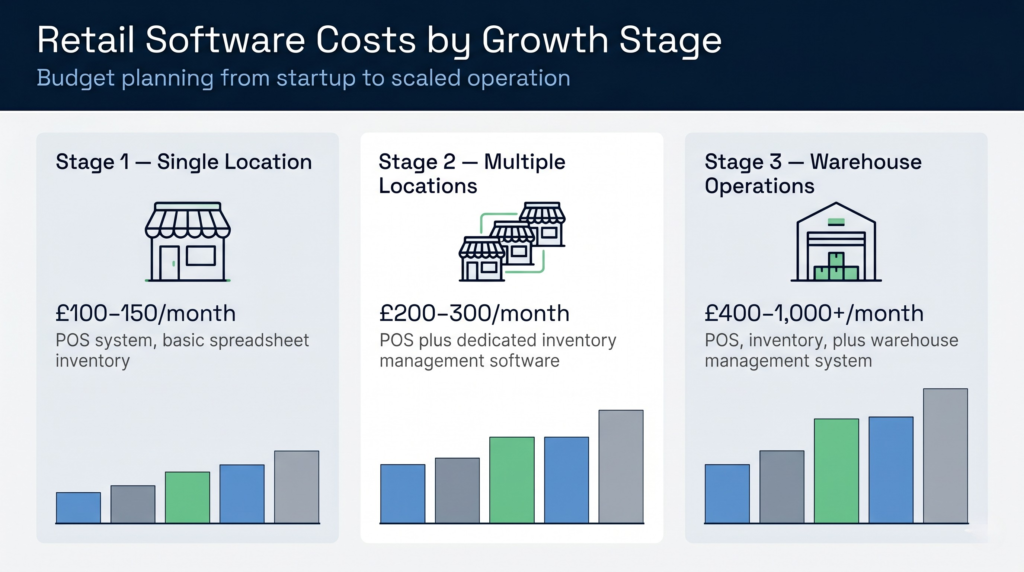
Stage 1: Single Location (Under £100k revenue)
A cloud POS like Square or Till, manual spreadsheet for inventory. Cost: £100–150 per month. Works fine for early-stage because inventory complexity is low.
Stage 2: Multiple Locations (£100k–£500k revenue)
Add dedicated inventory software to the POS. Now you can track stock across two or three locations and prevent overselling. Cost: £200–300 per month.
Stage 3: Warehouse Operations (£500k+ revenue)
Add a warehouse management system to handle multiple locations, higher volumes, and possibly third-party logistics. This is when a small business retail management software approach isn’t enough—you need a WMS. Cost: £400–1,000+ per month.
Stage 4: Managed Growth (£1m+ revenue)
Mature retailers often add advanced analytics, demand planning, and supply chain visibility tools. They might also integrate with a 3PL partner who uses a dedicated WMS for their warehouse operation.
The key is matching your software to your operational stage. Don’t overspend early, but don’t underspend when you’re ready to scale.