

Retail software has become essential for any business serious about competing in today’s market. Whether you’re running a single store or managing multiple locations across the UK, the right retail software can transform how you operate, from managing stock to tracking sales and keeping customers happy.
But what exactly is retail software? And how does it fit into your broader business operations, especially if you’re handling your own fulfilment? In this guide, we’ll walk you through everything you need to know about retail software, the key features to look for, and how to choose the right system for your business.
What Is Retail Software and What Does It Do?
Retail software is a digital system designed to help you manage the core functions of running a retail business. At its heart, retail software handles transactions, inventory tracking, customer data, and reporting. Think of it as the backbone of your retail operations, connecting everything from the till to your back office.
The beauty of modern retail software is that it doesn’t just process sales. It gives you real-time insights into what’s selling, who’s buying it, and how much stock you have at any given moment. This intelligence is crucial when you’re trying to make smart decisions about purchasing, pricing, and store layout.
For UK retailers, the landscape has shifted dramatically over the past decade. The rise of online shopping and multi-channel selling means that retail software now needs to do far more than manage a physical till. It needs to sync data across your shop floor, your website, your warehouse, and potentially multiple sales channels. This is where things get interesting, because your retail software sits at the heart of a much larger ecosystem.
How Retail POS, Inventory, and ERP Systems Work Together
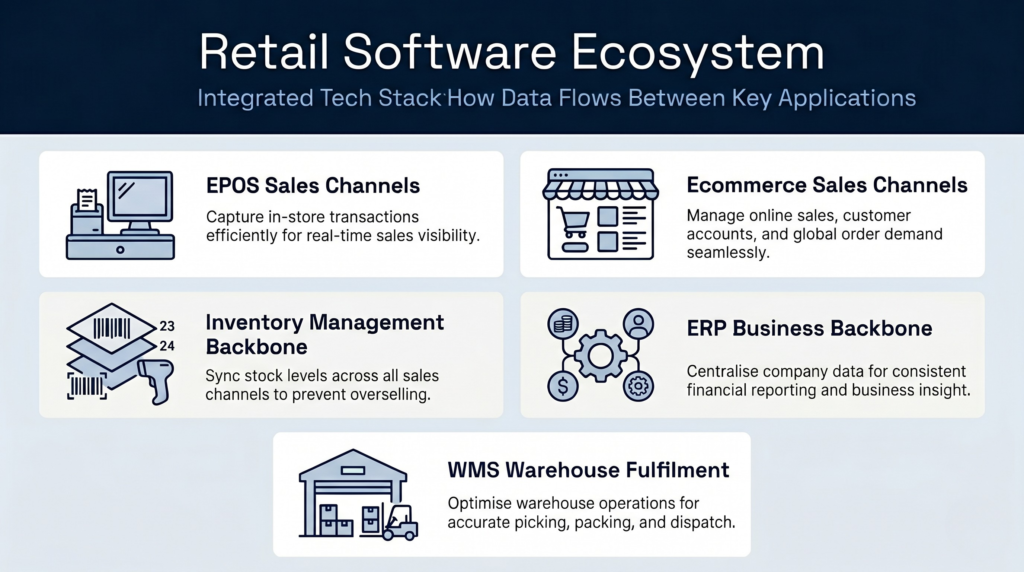
Most retailers use three interconnected systems: a point of sale (POS) system, inventory management, and enterprise resource planning (ERP) software. Understanding how these fit together is key to choosing the right solution.
The Point of Sale Layer
Your retail point of sale system is what your staff use every day to ring up sales, take payments, and handle returns. A modern POS system for retail stores goes well beyond the old-fashioned till. Systems like Square’s retail POS capture every transaction in real time and feed that data upstream into your inventory and accounting systems.
The Inventory Management Layer
Running parallel to your POS is inventory management software. This tracks stock levels, reorder points, and supplier information. When a customer buys an item at the till, your inventory system should update automatically. If you’re running low on stock, it should alert you to reorder. For multi-location retailers, inventory software becomes even more critical because you need to see stock levels across all your stores at a glance.
The ERP Integration
Enterprise resource planning (ERP) software brings it all together. An ERP retail system integrates your POS data, inventory, purchasing, finances, and customer information into a single platform. So when a customer buys something in your shop, that sale flows through your POS, updates inventory, and appears in your financial reporting—all automatically.
Systems like NetSuite’s retail ERP software and Sage UK’s retail business software are designed to manage this complexity. They’re built for retailers who’ve outgrown basic point-of-sale systems and need visibility across the whole business.
Key Features for Multi-Channel Retail Software
If you’re selling through more than one channel—your physical shop, your website, maybe a marketplace like Amazon or eBay—your retail software needs to work harder. Multi-channel retail software must synchronise inventory across all your sales channels so that when you sell one unit online, it disappears from your physical stock count immediately.
Here’s what you should look for:
- Unified inventory visibility: See stock across all locations and channels in one place, updated in real time.
- Automated order routing: Orders from any channel should flow into a single system and be ready for picking and packing.
- Multi-currency and tax handling: If you’re selling internationally, your system needs to handle currency conversion and tax compliance across different markets.
- Customer data integration: All your customer interactions—online and offline—should feed into one customer record, so you understand their full purchase history.
- API and third-party integrations: Your retail software should play nicely with payment processors, shipping carriers, accounting software, and other tools you rely on.
- Reporting and analytics: You need dashboards that show you which products are trending, which channels are performing best, and where your profit margins are strongest.
For a detailed look at how inventory systems work alongside your retail operations, you might want to understand how warehouse management systems (WMS) complement your retail software—especially if you’re handling your own fulfilment.
Integrating Retail Software With a Warehouse Management System
Here’s where many UK retailers hit a fork in the road. Once your business reaches a certain size, you’ll likely move from storing stock in a back room to running an actual warehouse or fulfilment centre. This is when you need to think about warehouse management.
Your retail software and your warehouse management system need to talk to each other seamlessly. When an order comes in through your retail system, it should automatically create a pick list in your warehouse. When that order is packed and shipped, the tracking number should flow back into your retail system and then to your customer.
This integration becomes even more critical when you’re managing stock rotation properly or handling products with batch and date code requirements. Without proper warehouse management, you risk picking old stock first, wasting product, and disappointing customers.
If you’re running your own warehouse as a retailer, you need a purpose-built solution. A UK warehouse management system designed for retail operations—rather than a generic 3PL platform—will understand the unique pressures you face: fast-moving inventory, tight margins, and the need to balance multiple sales channels efficiently.
Choosing Retail Software for Small UK Businesses
Not every small retailer needs an enterprise ERP system. There’s a spectrum of solutions available, and choosing the right one depends on where you are now and where you’re heading.
Small Stores and Independent Retailers
If you’re running a single shop with limited inventory, a cloud-based POS system combined with basic inventory tracking might be enough. Systems designed for small retailers are typically affordable, easy to set up, and don’t require a dedicated IT team to maintain.
Growing Multi-Location Retailers
Once you reach two or three locations, you need visibility across all your stores. At this point, you’ll benefit from a more integrated system that can track inventory centrally but give each manager visibility of their own location. This is where mid-market retail software excels.
Multi-Channel Retailers
If you’re selling through your website and physical stores—and especially if you’re handling your own fulfilment—you need a solution that can sync inventory across channels and automate order management. This typically means moving to a more robust ERP or commerce-specific platform.
When evaluating options, check Software Advice’s directory of retail management software for user reviews and comparison tools. You’ll find detailed breakdowns of features, pricing, and real user feedback.
Evaluating Retail Software Solutions
The market is crowded with retail software vendors, each claiming to be the best. Here’s how to cut through the noise:
Total Cost of Ownership
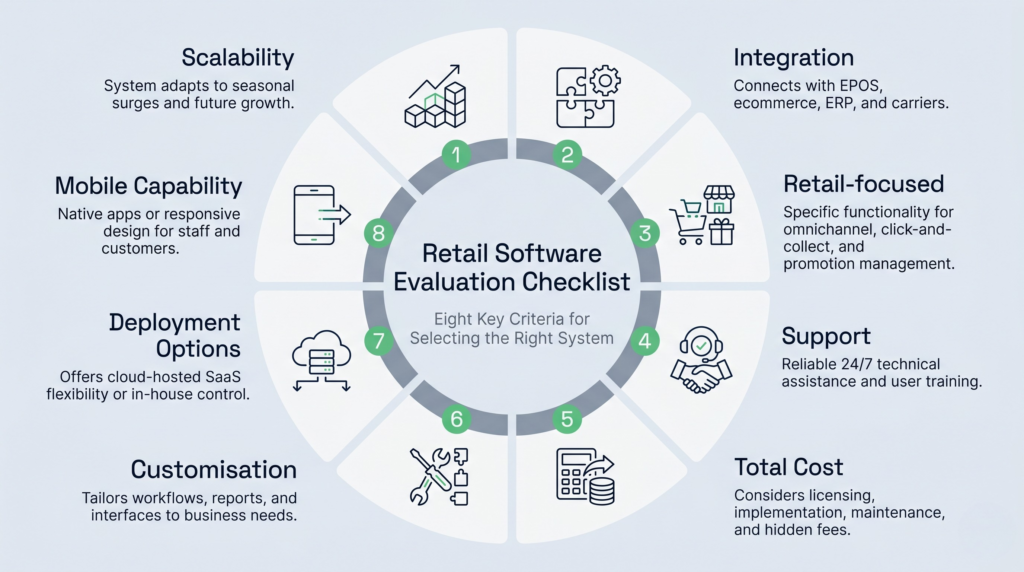
Look beyond the monthly subscription fee. Factor in implementation costs, staff training, data migration, and ongoing support. Some systems are cheap upfront but expensive to run. Others cost more to implement but have lower operating costs in the long run.
Implementation Speed
How long will it take to get the system live? For small retailers, weeks of implementation might sink your business. Look for platforms that can be up and running in days, not months.
Scalability
Choose a system that will grow with you. If you’re planning to add stores, expand online, or enter new markets, you need software that won’t leave you outgrown in two years.
Support and Community
When things go wrong—and they will—you need reliable support. Check reviews to see how responsive vendors are, and whether there’s a community of users you can learn from.
Growing from retail software to omnichannel operations
Most retailers start with basic retail software. As you grow, you’ll discover gaps. You might add an e-commerce platform, then expand to a second location, then move into marketplace selling. Each step requires more sophisticated software.
At some point, usually when you’re running 5+ store locations or shipping more than 500 orders per week from a warehouse, you’ll realise that your retail software isn’t equipped for warehouse operations. This is the critical moment. You need to add a purpose-built WMS, such as Clarus WMS.
A WMS designed for your specific needs, whether you’re a 3PL provider or a retailer with their own warehouse, will dramatically improve your efficiency. It’ll reduce picking errors, speed up order fulfilment, and free up your team to focus on customer-facing work. The best approach is to choose retail software and a WMS that integrate smoothly. Your retail software handles the customer side; Clarus WMS handles the warehouse side.
When choosing systems, ask potential vendors about their integration partnerships. Do they work well with WMS platforms like Clarus WMS? Can they sync inventory in real-time? The answer will tell you whether they’re truly designed for growing retailers or just small shops.
The role of stock rotation in retail operations
One often-overlooked aspect of retail software is stock rotation management. Good retail software enforces rotation rules to prevent waste. The most common rule is FEFO (First Expired, First Out), which is critical for food and beverage retailers but also applies to any product with a shelf life or a best-before date.
When your retail operation scales to include a warehouse, your software must enforce rotation even more strictly. Following the correct rules for effective stock rotation prevents waste, reduces returns, and improves customer satisfaction. Most retail inventory software doesn’t enforce rotation deeply enough, which is another reason why growing retailers add a WMS. Your WMS can enforce rotation rules at the bin level and prevent picking expired stock.